
Touchline/multigraf CF375 folder - loud clunk and error every other run

cheapfood

New member
Hiya all,
I've been using a Touchline CF375 recently, but it has a consistent error where every other run, there is a quieter clunk (and the roller drive belt suddenly stops for a moment) , followed by a loud one when the rollers stop fully. With the sides off, I can't see any movement from any of the folder/creaser blades but might be missing something.

The error that appears is this:
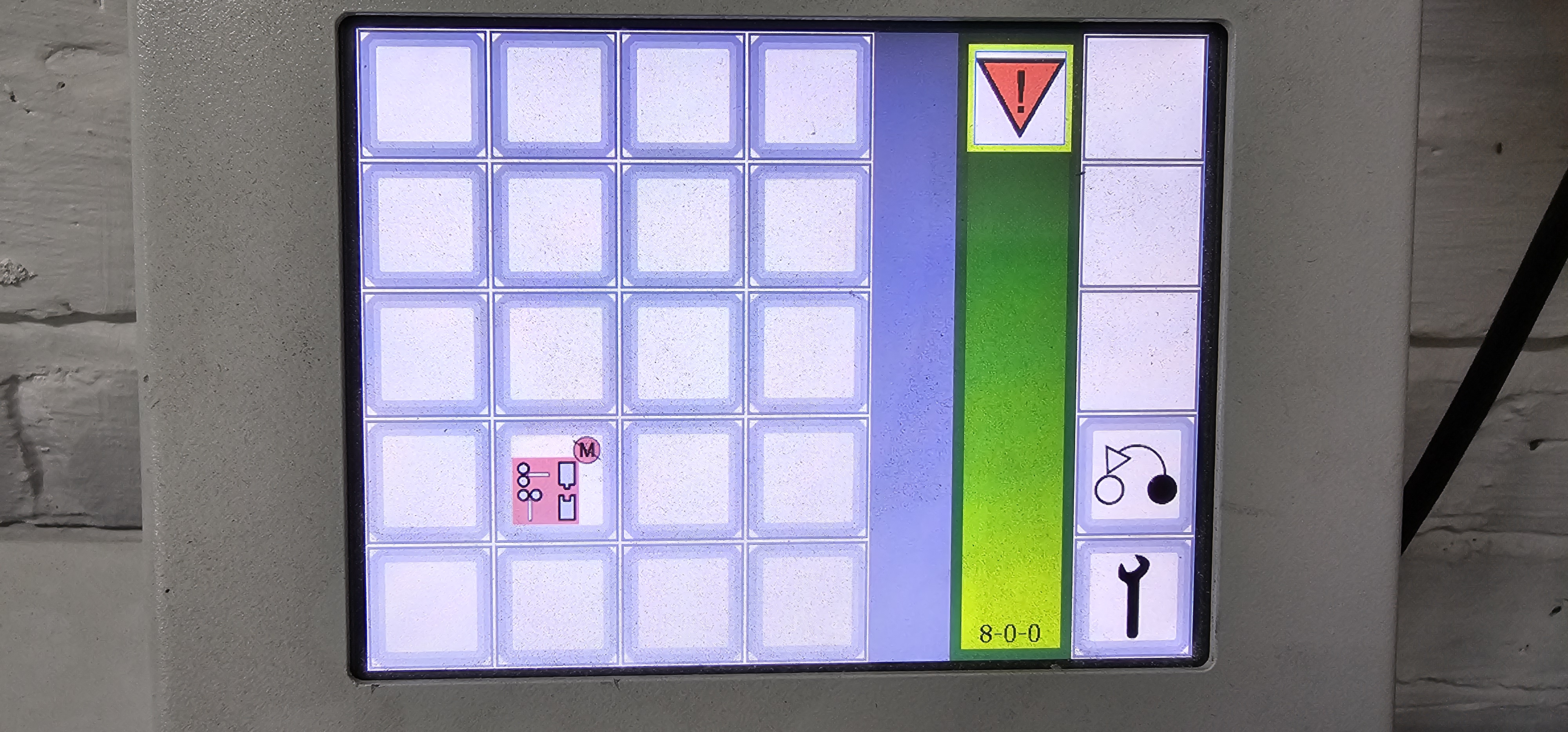
1000015233.jpg

This can be cleared and the next attempt works without issue, but it would help my workflow if anyone knows what the cause could be? I don't have access to a service manual so have been trying to diagnose by sight and past posts on here.

There is another issue with the creaser constantly triggering when enabled on a job, even before the cards are feeding, but I'm not sure if that's as easy of a fix.

I can provide video if helpful too

Thank you in advance to anyone with thoughts

 
that error looks like a motor error for either the creaser bar or drive belts. Check the pullies for a loose set screw or missing teeth in the cog belt. With the covers off the fold blades should function back n forth smoothly. Leave them out of place and make sure they return home upon start up. Try a different program with just folding and just creasing. See if something different happens.
 
that error looks like a motor error for either the creaser bar or drive belts. Check the pullies for a loose set screw or missing teeth in the cog belt. With the covers off the fold blades should function back n forth smoothly. Leave them out of place and make sure they return home upon start up. Try a different program with just folding and just creasing. See if something different happens.
Thank you! I'll let you know if I find anything on Monday
 
that error looks like a motor error for either the creaser bar or drive belts. Check the pullies for a loose set screw or missing teeth in the cog belt. With the covers off the fold blades should function back n forth smoothly. Leave them out of place and make sure they return home upon start up. Try a different program with just folding and just creasing. See if something different happens.
I've checked all the the creaser blades by moving them from the home position and they all returned. I've also tightened any loose set screws i could find on the pulleys.
I did manage to catch the first of the two clunks on slomo video (seen at one of the roller gears) and it looks like the roller motor actually reverses suddenly, much quicker than it was even turning forward. I'll video the motor itself today to double-check and update, maybe with the belt disconnected to see if it does this in isolation.


I disconnected the tranport serpentine belt and left just the motor and the first gear connected, but at the motor end it seems like the motor actually moves faster when the clunk happens.


This is the full experience: the first run will work, but the following attempt will fail after a few seconds (you can hear the clunk at 0:29):

I timed the pause before the transport motor turns on (on the first run) and it's 8 seconds.
After pressing the stop button, the feeder section stops but the transport motor will still be turning the rollers.
On the second run, 8 seconds will pass before the motor gets that jolt and from there, it's only a little while until the error appears.
Is there any chance it could be trying to start the motor, not realising it's already running?

Right now, my thoughts on fixes are:
  • changing the motor PCB
  • updating the firmware if possible (?)
  • switching motor 1 and 2 (this doesn't feel like the right move to me, as the motor consistently runs fine on the first attempt)
Does anyone have a service manual or any other resources that could help with this? I'm still troubleshooting but a guide could help

Any thoughts are welcome too
 
FYI the board and motor are very expensive. I dont get why it stops/ starts like it does. switching the motors is just the 3 cable assemblies. you dont need to switch the actual motor just yet.
when you stop it the motor does run for a bit if i remember its not a instant stop.
 
   
Back
Top
