

Prepress automation beta | ReadySetPDF

DarrenM

New member
Hey everyone,

I know how many hours we lose in prepress just setting up complex step-and-repeats.

I got tired of the workarounds and piecing together different tools, so I built a standalone desktop automation tool called ReadySetPDF. I designed it specifically for small to medium-sized print shops to bypass the cloud entirely. It runs 100% on your local hardware, which means zero upload time and zero lag. We are currently in beta and would love feedback via the integrated feedback form.

We are currently in active Beta, pushing daily updates and rapid bug fixes based entirely on what our testers actually need in their daily workflows. I'm looking for a few shops to really put the software through its paces and see what breaks. As we all know, so many compression and workflow variables it is almost impossible to test without releasing into the wild.

The Beta Tester Reward: If your team tests the software and provides feedback through the built-in bug reporter, you will receive a free Lifetime Pro License when the software officially launches.

Here is what it currently handles:
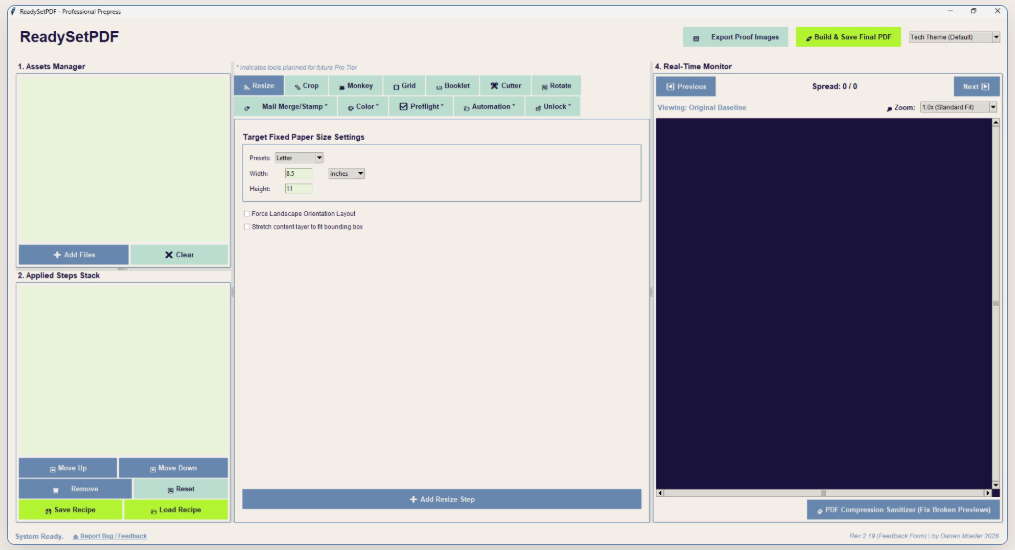
  • Automated Hot Folders (Game Changer): Set it and forget it. Designate watch folders on your local network. ReadySetPDF automatically monitors them, applying your pre-configured templates, impositions, and prepress checks so jobs are ready to print by morning.
  • Variable Data Handling (Core Tool): Process massive Variable Data Printing streams rapidly using your own hardware. With no browser limitations or lag, you can seamlessly link CSV data sets to PDF templates for personalized direct mailers and healthcare compliance letters.
  • Step & Repeat Imposition: Maximize your sheet yield instantly. Input custom row/column counts, define exact gutter spacing, and let the engine step-and-repeat single records into production-ready multi-up press sheets in seconds. Ideal for business cards and tags.
  • Automated Booklet Maker: Stop wrestling with reader-to-printer spreads. ReadySetPDF automatically paginates multipage documents into perfect 2-up saddle stitch layouts, applying precise spine creep based on your specific paper caliper for flush face trims.
  • Prepress Preflight Reports: Catch costly errors before they ever reach the plate. Generate detailed preflight reports that analyze files for missing fonts, low-resolution imagery, RGB vs. CMYK color space issues, and improper trim/bleed box definitions.
  • PDF Unlock & Decryption: Bypass frustrating file restrictions. Instantly remove owner passwords and print-lock restrictions from client-supplied PDFs so you can preflight, impose, and send files to the RIP without workflow interruptions.
  • Advanced Batch Processing: Process entire folders of PDFs simultaneously. Consolidate chaos into a single print run by seamlessly merging dozens of files into one optimized master document, or apply crop marks and scaling to hundreds of files in a single click.
  • Crop & Bleed Mark Generator: Generating printer marks shouldn't be a guessing game. Apply professional perimeter crop marks, center marks, and define trim boxes globally across any document. Ensure your bindery department has exactly the edge-to-edge indicators they need.
  • Page Extraction & Splitting: Break down massive batch files into manageable chunks for different presses. Extract specific page ranges, split a 10,000-page file into 1,000-page segments, or pull single records out of a corrupted print stream instantly.
  • Automated Blank Page Insertion: Fix duplexing errors before they hit the press. Automatically insert blank pages to force right-hand reading, pad documents to divisible page counts for booklet making, or ensure chapter starts always land on the front of a sheet.
  • Document Resizing & Scaling: Standardize customer files instantly. Force non-standard client PDFs into standard print dimensions (Letter, Tabloid, Custom) while intelligently maintaining aspect ratios, centering content, and automatically adjusting the trim box definitions.
  • Optical character Recognition (OCR): Unlock text from flattened client scans instantly. Leverage the built-in Tesseract AI engine to extract characters from rasterized images into plain text or structured CSV manifests, or generate searchable archival-grade PDFs by injecting an invisible text layer directly over the original artwork.
You can grab the portable download here (no complex installation required, just unzip and run): ReadySetPDF - Prepress Automation for Print Shops

1783008672074.png


Best,
ReadySetPDF team
 
Last edited:
Hey everyone,

I know how many hours we lose in prepress just setting up complex step-and-repeats.

I got tired of the workarounds and piecing together different tools, so I built a standalone desktop automation tool called ReadySetPDF. I designed it specifically for small to medium-sized print shops to bypass the cloud entirely. It runs 100% on your local hardware, which means zero upload time and zero lag. We are currently in beta and would love feedback via the integrated feedback form.

We are currently in active Beta, pushing daily updates and rapid bug fixes based entirely on what our testers actually need in their daily workflows. I'm looking for a few shops to really put the software through its paces and see what breaks. As we all know, so many compression and workflow variables it is almost impossible to test without releasing into the wild.

The Beta Tester Reward: If your team tests the software and provides feedback through the built-in bug reporter, you will receive a free Lifetime Pro License when the software officially launches.

Here is what it currently handles:

  • Automated Hot Folders (Game Changer): Set it and forget it. Designate watch folders on your local network. ReadySetPDF automatically monitors them, applying your pre-configured templates, impositions, and prepress checks so jobs are ready to print by morning.
  • Variable Data Handling (Core Tool): Process massive Variable Data Printing streams rapidly using your own hardware. With no browser limitations or lag, you can seamlessly link CSV data sets to PDF templates for personalized direct mailers and healthcare compliance letters.
  • Step & Repeat Imposition: Maximize your sheet yield instantly. Input custom row/column counts, define exact gutter spacing, and let the engine step-and-repeat single records into production-ready multi-up press sheets in seconds. Ideal for business cards and tags.
  • Automated Booklet Maker: Stop wrestling with reader-to-printer spreads. ReadySetPDF automatically paginates multipage documents into perfect 2-up saddle stitch layouts, applying precise spine creep based on your specific paper caliper for flush face trims.
  • Prepress Preflight Reports: Catch costly errors before they ever reach the plate. Generate detailed preflight reports that analyze files for missing fonts, low-resolution imagery, RGB vs. CMYK color space issues, and improper trim/bleed box definitions.
  • PDF Unlock & Decryption: Bypass frustrating file restrictions. Instantly remove owner passwords and print-lock restrictions from client-supplied PDFs so you can preflight, impose, and send files to the RIP without workflow interruptions.
  • Advanced Batch Processing: Process entire folders of PDFs simultaneously. Consolidate chaos into a single print run by seamlessly merging dozens of files into one optimized master document, or apply crop marks and scaling to hundreds of files in a single click.
  • Crop & Bleed Mark Generator: Generating printer marks shouldn't be a guessing game. Apply professional perimeter crop marks, center marks, and define trim boxes globally across any document. Ensure your bindery department has exactly the edge-to-edge indicators they need.
  • Page Extraction & Splitting: Break down massive batch files into manageable chunks for different presses. Extract specific page ranges, split a 10,000-page file into 1,000-page segments, or pull single records out of a corrupted print stream instantly.
  • Automated Blank Page Insertion: Fix duplexing errors before they hit the press. Automatically insert blank pages to force right-hand reading, pad documents to divisible page counts for booklet making, or ensure chapter starts always land on the front of a sheet.
  • Document Resizing & Scaling: Standardize customer files instantly. Force non-standard client PDFs into standard print dimensions (Letter, Tabloid, Custom) while intelligently maintaining aspect ratios, centering content, and automatically adjusting the trim box definitions.
You can grab the portable download here (no complex installation required, just unzip and run): ReadySetPDF - Prepress Automation for Print Shops

View attachment 294978

Best,
ReadySetPDF team
when will you have a mac version?
 
when will you have a mac version?
That is a wonderful question. Since I'm building in Python, and on a PC, there is a significant hurdle to cross to make compatible with MAC. I will continue researching, but for now 2.20 is now released.

Changelog​


[2.20] - 2026-07-06 Major Features & Core Upgrades

True Vector Color Space Conversion: Completely overhauled the color conversion engine. Exporting documents to Grayscale, Black & White, or CMYK no longer rasterizes or flattens the file. Ghostscript Engine Integration: The industry-standard Ghostscript engine is now baked directly into the ReadySetPDF executable. Users no longer need to install external dependencies to get professional-grade color remapping. Preserved Editability: Because color conversions are now handled mathematically at the vector level, all text remains fully highlightable and editable in Acrobat after export. Crisp Graphics & Smaller Files: Fixed an issue where converting color spaces would cause graphics to pixelate or become blurry. Vector lines remain infinitely scalable, and file sizes remain lean. Performance Improvements Dual-Render Pipeline: The app now intelligently uses two different rendering methods. It continues to use high-speed rasterization for the Live Preview window to prevent UI lag while adjusting settings, but switches to the deep vector Ghostscript engine for the final production export.

Thank you for the request.
 
That is a wonderful question. Since I'm building in Python, and on a PC, there is a significant hurdle to cross to make compatible with MAC. I will continue researching, but for now 2.20 is now released.

Changelog​


[2.20] - 2026-07-06 Major Features & Core Upgrades

True Vector Color Space Conversion: Completely overhauled the color conversion engine. Exporting documents to Grayscale, Black & White, or CMYK no longer rasterizes or flattens the file. Ghostscript Engine Integration: The industry-standard Ghostscript engine is now baked directly into the ReadySetPDF executable. Users no longer need to install external dependencies to get professional-grade color remapping. Preserved Editability: Because color conversions are now handled mathematically at the vector level, all text remains fully highlightable and editable in Acrobat after export. Crisp Graphics & Smaller Files: Fixed an issue where converting color spaces would cause graphics to pixelate or become blurry. Vector lines remain infinitely scalable, and file sizes remain lean. Performance Improvements Dual-Render Pipeline: The app now intelligently uses two different rendering methods. It continues to use high-speed rasterization for the Live Preview window to prevent UI lag while adjusting settings, but switches to the deep vector Ghostscript engine for the final production export.

Thank you for the request.
You might want to consider developing the other way around. I've never seen a prepress room not filled with Macs.
 
2.21 released. Added OCR output, which works fabulously with automated hot folders.

[2.21] - 2026-07-09
New Features & Pro Tools

OCR Text Extraction (Pro Tier): Integrated the Tesseract engine to unlock text from flattened client scans and rasterized PDFs.

Multiple Extraction Modes: Operators can now extract scanned text directly to a plain .txt file, a structured .csv (perfect for feeding lists directly into the VDP Mail Merge tool), or generate an archival-grade "Searchable PDF" that overlays an invisible, highlightable text layer perfectly over the original pixel artwork.

Offline Processing: The Tesseract engine is fully baked into the executable. All document scanning and text recognition happens 100% locally on your machine, ensuring zero cloud API calls and maximum security for sensitive client data.
 
I have been playing with this and I have sent you a couple of bug reports/suggestions by the inbuilt form but I haven't heard anything back and they are not fixed in the latest build.

1. Metric measurements seem to wildly off - on the impostition for example (it also happens on the booklets as well), if I load a business card 85x55 and try to impose that onto a custom sheet size of 320x450mm the resultant PDF page is 5050mm x 5050mm.
2. Allow us to save custom page sizes
3. make the unit of measurement a global setting rather than having to change it on each function.


Cheers
Chris
 
I have been playing with this and I have sent you a couple of bug reports/suggestions by the inbuilt form but I haven't heard anything back and they are not fixed in the latest build.

1. Metric measurements seem to wildly off - on the impostition for example (it also happens on the booklets as well), if I load a business card 85x55 and try to impose that onto a custom sheet size of 320x450mm the resultant PDF page is 5050mm x 5050mm.
2. Allow us to save custom page sizes
3. make the unit of measurement a global setting rather than having to change it on each function.


Cheers
Chris
I did indeed receive the submission last night, but none before.

v2.3 is now live and addresses the 3 point of feedback, as well as multithreading for background batch processing.


[2.3] - 2026-07-11 July 11, 2026

🚀 New Features & Enhancements

Background Processing (Multithreading): The Automation and Hot Folder tools now run on a dedicated background thread. You can now execute massive batch processes and OCR scans without freezing or locking up the main user interface. A new "Real-Time Dashboard" in the header tracks all background tasks.

Global Settings Menu: Added a dedicated ⚙️ Global Settings button to the main header, centralizing application preferences and color themes.

Universal Measurement Units: You no longer need to select units on every individual tab. You can now set your preferred unit (Inches, Millimeters, or Points) in the Global Settings, and the entire application will instantly adapt.

Custom Page Size Presets: Users can now create, name, and save unlimited custom sheet sizes (e.g., SRA3 320x450mm). These custom sizes automatically inject themselves into the standard preset dropdowns across the Resize, Monkey, Grid, and Booklet tabs.

Persistent Preferences: Application settings, themes, and custom page sizes now save securely to your local Windows AppData folder. Your preferences will persist permanently, even if you close the app, move the .exe file, or update to a newer version of the software.

🐛 Bug Fixes & Engine Upgrades

Universal Math Engine (Metric Fix): Completely overhauled the PyMuPDF geometry logic. Stripped out all localized tab math and replaced it with a centralized to_points() engine. This permanently resolves the severe metric scaling bug where Millimeter conversions were resulting in astronomical page dimensions (e.g., 5050mm).

VDP Visual Targeting Fix: Patched a critical scaling bug in the VDP Mail Merge tab where the green visual targeting box would shrink to an unusable 1/72nd of its size when processing non-inch inputs.

Standard Preset Conversion: Standard US sizes (Letter, Legal, Tabloid) now actively listen to the Global Unit setting and will safely convert and populate their exact equivalents in millimeters or points when clicked.
 
Last edited:
   
Back
Top