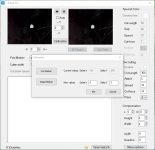
I have an F-Mark connected to a Graphtec CE6000-40 Plus. Both machines work, but the iMark software is not calibrating, only showing the x and y values with 0.
I have attempted to calibrate multiplle times. The camera works fine, is not dirty or blurry. It sees the white cut square clearly. I have reinstalled the iMark software, reset the CE6000 to default and reinitiated the connection to the iMark software, and checked the roller positions and it still shows 0 after reading the mark to calibrate. I tested the cut using the 0 values and it lifts the media to the rollers, grabs it and then sends it to the exit tray, I have also replaced the usb hub, which seemed to make no difference. Each time I attempt to calibrate to read the cut mark, it only shows 0 for both x and y values.
If anyone who has had this problem and resolved it, I would appreciate your help with this vexing issue!
I have attempted to calibrate multiplle times. The camera works fine, is not dirty or blurry. It sees the white cut square clearly. I have reinstalled the iMark software, reset the CE6000 to default and reinitiated the connection to the iMark software, and checked the roller positions and it still shows 0 after reading the mark to calibrate. I tested the cut using the 0 values and it lifts the media to the rollers, grabs it and then sends it to the exit tray, I have also replaced the usb hub, which seemed to make no difference. Each time I attempt to calibrate to read the cut mark, it only shows 0 for both x and y values.
If anyone who has had this problem and resolved it, I would appreciate your help with this vexing issue!