

Gumming issue +image

lovacgrf

Member
Hi

I have a problem I cant solve,

so I need some kind of test where I can see if the plates are gummed enough

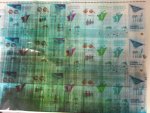
this is result after putting plates into press..

fetch


(dont know if this is gum solution issue, or gum rollers pressure..)

i hope that someone can help me

ty
 

Attachments

  • photo4744.JPG
    photo4744.JPG
    1.2 MB · Views: 325
If you want to test your theory that the plates are inadequately gummed, take a plate fresh from the plate processor and put it in a sink. Rinse it well with warm to hot water and then gum the plate by hand with gum Arabic. Make sure you buff the gum dry with a clean soft cloth. If this plate rolls up cleanly then the processing of the plate certainly needs investigation.
I share Green Printer's skeptisim that poor gumming would be the cause of what your picture shows unless the plates are processed many days prior to use. Perhaps you could provide some more information as to the type of plates, press, dampening system, fountain solution, and ink.....
 
Hello fellow Lithographers,

re Plate Gumming - 1) Photo shows - Classic case of a badly gummed -up plate, which results in Plate Oxidation, clearly shown by the Ink Scum
 
I share Green Printer's skeptisim that poor gumming would be the cause of what your picture shows unless the plates are processed many days prior to use. Perhaps you could provide some more information as to the type of plates, press, dampening system, fountain solution, and ink.....


Press is KBA rapida 105, ink Apple, fountaine solution is standard for years and it worked fine, developer is KODAK Goldstar premium, gum Eggen Agum C, plates Brillia and Kodak Capricorn GT

The thing is that some plates are gummed OK and some are bad, like 3 in a row are ok and then 2 arent..
 
   
Back
Top









