Canon imagePRESS V1000: a year of repeatable issues, “within spec”

MPrint14

New member
Any help is appreciated.

I own a family print shop,I run a small family print shop. I’m not formally trained, but I’ve operated digital presses for six years and I know how a sheet should look and how to calibrate for consistency. I also know how to calibrate and keep consistency. Based on what Canon sold me and what their literature promises, my V1000 is not performing as expected.

Issues i am experiencing-

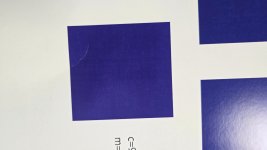
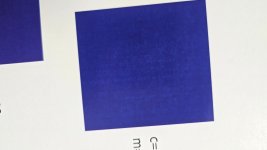
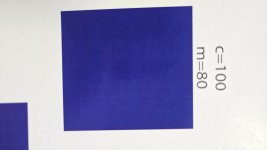
•CMYK blues drift violet. C100 M80, C100 M90, C100 M100 all skew purple.
• Skin tones print yellow.
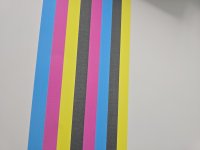
• Mottling and occasional banding in large solids.
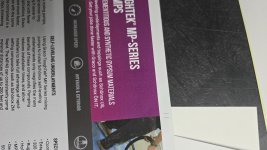
• Detail looks soft and grainy. Faces are not sharp whatsoever. Detail is not crisp.
• Color lacks saturation and punch. Dull
More plainly, the colors incorrect. The prints are not sharp. Everything is washed out.


Actions taken
• Paper Catalog mapping verified per stock. Tested heavier coated mappings.
• Auto Gradation Full CMYK per stock and tray.
• Shading Correction per stock.
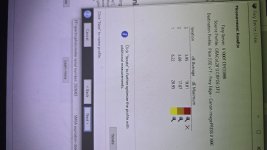
• Fiery calibration sets created on the exact stocks with spectro and applied.
• Job Properties for isolate tests: CMYK source Bypass conversion, Use CMYK embedded profiles off, Output profile = stock profile, Screening = Default/Text-Graphics.
• Also tested SWOP2013 CRPC5 and GRACoL2013 CRPC6 simulations.
  • I have had printers in my area print the same files, even a Konica Minolta 3070 i had before this machine, all pop and do not have the issues. A printer right down the road from me has a canon c800, printed the test prints i had and included this in the data i supplied the canon tech to which he ignored stating different machine. I get that, but the print quality is noticeable.
  • i have prints to compare from the beginning of us receiving the machine proving degradation.

Per our lease/service agreement, our dealer flew in a Canon tech. He inspected on site, acknowledged an issue, and took print samples back to his office. He said he would confer with Canon and report back. After repeated follow-ups over the next two months, my dealer contact relayed that “Canon says it is within spec.”I asked what reference and tolerances they used and what “within spec” meant. No answer since. The defects persist
I get gaslit and dismissed. I don't have enough knowledge to prove an issue that is actionable.

I can attach the isolate sheets, engine charts, and verification reports. If there’s a specific test or report format the community wants to see, I’ll supply it. I am willing to do whatever to get resolution.
Thanks!
 

Attachments

  • 20251107_000010.jpg
    20251107_000010.jpg
    933 KB · Views: 351
  • 20251111_143413.jpg
    20251111_143413.jpg
    1.7 MB · Views: 284
  • 20251111_143324.jpg
    20251111_143324.jpg
    894.8 KB · Views: 288
  • 20251111_142811.jpg
    20251111_142811.jpg
    911.7 KB · Views: 293
  • 20250824_172830.jpg
    20250824_172830.jpg
    2 MB · Views: 288
  • 20250819_174812.jpg
    20250819_174812.jpg
    1.6 MB · Views: 289
  • 20250819_174549.jpg
    20250819_174549.jpg
    794.9 KB · Views: 277
  • image-1762495523659.jpg
    image-1762495523659.jpg
    887 KB · Views: 292
  • 20251111_102424.jpg
    20251111_102424.jpg
    574.1 KB · Views: 302
  • 20251111_102420.jpg
    20251111_102420.jpg
    532.5 KB · Views: 296
  • 20251111_102417.jpg
    20251111_102417.jpg
    443.4 KB · Views: 311
I’m not a canon guy so I can’t help directly or state what is normal performance on that machine…but I would first request the customer expectations document..I always request this before signing..this will be the technical definition of what spec is for your device.

Have you tried going around the dealer to canon direct? There may be a cost associated with it, but perhaps through some magic you could get their tech and or color specialist out to confirm or correct issues, and maybe they could find a way take over your service.

I have only had one machine serviced by a third party, and it was a nightmare, and I eventually had to wrangle out of them to go direct. Some legal stuff to get the ball rolling but at the end of the day they were just as done with me so it wasn’t that difficult to get out of.
 
You samples are horrendous. The first thing I'd say is your line screens don't seem to be set up correctly, but beyond that, your prints are washed out and you have a ton of banding. I wouldn't consider any of those prints sellable where I work.

I've demoed a V1350, and the prints were sharp and vibrant, so there's 100% something wrong with your machine. Do you have any of the samples from when you initially demoed the printer before purchase?

One last thing, I've only run PrismaSync versions of Canon, but on my controller I have a way to reset everything to factory defaults, and then create new profiles. That might be an option worth trying?
 
That is Canon's standard operating procedures. Everything is in spec even when it's blatantly not. Usually when they fly someone in, they then tell the tech that $3k in parts need to be replaced. Which of course does nothing to fix the problem. They are not an honorable company. I've replaced my dozen+ 800s and 910s with Ricoh's. They aren't perfect either but at least they will acknowledge a mistake and correct it-at least that has been my first hand experience. The only good solution is to buy a KM or Ricoh.
 
We ended up sending our v1000 back to Canon after 6 months of fighting with it on colors/registration etc. They did finally replace a sensor which helped with colors but didn't solve all the other problems.
  • We have v900s now and they're way more reliable.
This is what worked for us:
  • Even with the v900s we cannot use the inline spectrometer for color at all. I was able to successfully prove the exact same results across three v900s where the colors all skew pink if we use the inline spectrometer. That's what will cause your blues to turn purple.
  • We also don't use all the color profiles. Instead we use the following setup:
    • Inside fiery we go to device center, profiles, set all the output profiles to use the plain profile (see screenshot)
    • Use the handheld spectrometer and hammermill paper and scan in your color profile to the plain profile. Now all paper stocks are using one color profile.
    • Every single day we first:
      1. Print our admin grayscale sheet (this gives us a baseline on the machine)
      2. Run auto gradation adjust
        • I forgot to mention that we recently learned that if you use the 'initialize' on auto gradation adjust you have to run it three times back to back for it to actually create a new profile. So don't use the initialize feature unless you've changed a drum.
      3. Print admin grayscale sheet again. If it looks mostly gray and isn't "too yellow" or "too pink" we run for the day.
      4. Only recolor calibrate using the handheld spectrometer if our gray sheet doesn't fall into line after steps 1-3.
    • If you use the canon's inline spectrometer, this grayscale sheet will be pink every single time (at least in our shop).
Grayscale Test Sheet:
  • It has a set of patches that should simulate grays with a little variation between the CMYK version and the K only version of the patches.
  • Here is a link to our in-house grays file. Admin Test Colors - Grays
Experts:
Caveat - I am not an expert and I've been reliable told by the experts that this is 100% the wrong method to use so, use at your own risk.
The canon/fiery peeps keeps telling me that we are wrong to do it this way but my 'unskilled' method works and is reliable so until the "experts" can give me something better than "well this is how it should be done" as an answer to why their system doesn't work I'm doing it my way.

IMO they made the system too complicated and too buggy and too many different color profiles and then set them all to expire every few days. We go in and turn off the 'auto' expiration and operate on the model of if it isn't broken don't fix it. We only color calibrate if the grays suddenly start turning out wrong. I know we are "wrong" to do it this way but I was pulling my hair out trying to get consistent colors and this system works for us.
 
@MPrint14

Do you have a handheld spectrophotometer? I just demoed a V700+Fiery whose default profiles I didn't like and I was able to get it in control using this.
We haven't acquired the machine yet but I suppose the inline spectrophotometer (ILS/SPM) should be able to do the same with some variance in procedure.
The point is to use the output profile in order to let the color management engine in the RIP adjust for the machine deficiencies. This will make Gracol simulations correct. You can also change the ISO Coated stuff below to use Coated Gracol 2013 instead.

How to create your own output profiles
  1. Create a PDF/TIFF of your CMYK color chart.
  2. Import the PDF to Fiery
  3. In CMYK, use Bypass Conversion (I tried ColorWise off... seems to have no effect and they both have the same result. Your result may vary).
  4. Print according to your stock/media. Let's use coated paper for now.
  5. Scan the sheet. I use dual pass so I can get UV data.
  6. I use M1, D50 lighting, and use Full Black Separation in i1profiler. The equivalent is GCR. Some people don't like it, but I do for ease of hitting colors and rich grays. Up to you to limit TAC usage for coated stock, but I would go 280-320 or just leave it at 400.
  7. Create the profile.
  8. Do the same thing for Uncoated paper (we use Book paper). This time, change the TAC limit to 250 to "mattify" the toner and look closer to uncoated offset print.
  9. This should yield you two profiles: Coated and Uncoated. Lets name them "Canon V700 Coated GCR TAC320 M1 D50 yyyy-mm-dd" and "Canon V700 Uncoated GCR TAC250 M1 D50 yyyy-mm-dd". This makes it easy to understand how they were made.
Now for the second set of instructions
  1. Import the color profiles into Fiery as Output profiles.
  2. Import two profiles into Fiery as CMYK Input/Simulation profiles
    1. Coated FOGRA39. Can be found in your PC if you have an Adobe installation. You can also use ISO Coated v2 instead.
    2. Uncoated FOGRA29. Can be found in your PC if you have an Adobe installation. You can also use ISO Uncoated instead.
  3. Get into your color management ticket settings thing.
  4. Set CMYK Source as Coated FOGRA39/ISO Coated V2 for coated stock or Uncoated FOGRA29/ISO Uncoated for uncoated like book/vellum stock.
  5. Optionally, and I prefer it this way, set RGB/LAB source to convert to CMYK source. There is this checkbox in the lower right of the color management screen.
    1. Up to you how to specify Rendering Intent and BPC.
      1. For uncoated, RelCol with BPC OR Perceptual w/wo BPC works well.
      2. For coated, RelCol without BPC for max saturation sacrificing details, or Perceptual.
      3. Another style is to copy the typical adobe program defaults which is Relative Colorimetric with BPC on.
How to test your machine using our Gray20 method in our HP indigo.
  1. Create a 12.5x18.25in or 13x19 document.
  2. Create a full-document element with the following values: C20, M20, Y20, K20.
  3. RIP and print this. Use bypass conversion to see your machine stats. For now lets use bypass conversion.
  4. The print should be neutral gray.
  5. The print should also be flat with minimal banding and no moire. It should also reveal any banding and its frequency (distance of each banding). The frequency can help you find the offending color and what is wrong. The frequency is basically the diameter of a bad roller.
  6. The machine I demoed still passed the colors for me with the instructions above even though it had banding in this gray20 test.
I hope this helps.

Good this I read about your problems. I'm about to evaluate the V700 and I should ask them about this. This is the key point for us versus the KM C4070 (it has great accurate default profiles for ISO Coated and ISO Uncoated, except for the shiny toner on FOGRA29). The IQ unit in a KM machine is more expensive with the KM machine. We chose the V700 to let the machine calibrate properly itself without someone like me to come in a use my spectro every calibration.
 
Last edited:
Since you have been patient and tried to let them fix the issue, and they are not meeting the expectation, you may want to escalate it if you haven't already. Write them a formal letter letting them know they are not meeting their end of the agreement, and let them know the next step is legal recourse if they don't make good on their end. For the sake of maintaining the relationship, I would first talk to my rep and let them know you will be forced to do this. Let them know how it is negatively impacting your business and plead with them to help you.
 
CMYK blues drift violet. C100 M80, C100 M90, C100 M100 all skew purple.
These values do make a dark purple...
1763144821825.png

Detail looks soft and grainy. Faces are not sharp whatsoever. Detail is not crisp.
The photo of the woman looks sharp. The photo of the graduate does not. It would be helpful to see the original file to check if it has the proper resolution, and to see if it's a sharp photo to begin with.

Skin tones print yellow.
I would be interested in viewing the original file of the woman that looks yellow to see if it does have too much yellow and the printer is correct. You can't trust your monitor...only the numbers. You can view the CMYK makeup in Acrobat Pro by going to Print Production>Output Preview, then hover over that area.

I'm not siding with Canon on this at all, but I used to sell production KM presses and customers would often complain about color issues like these. Once we actually reviewed their files, we found out the printer was printing it accurately. I'd even hear them say their old Xerox/Canon/Ricoh printed the color of a certain file just fine...which actually meant their old machine was not printing it accurately, or they just had it profiled to force it to work the way they wanted. I would show them this by changing the color profiles during a demo and they'd see the press could be manipulated to get whatever color they wanted.

As for mottling of the large solids, have you tried different types of paper with the exact same file and still get the same results? For instance, if you're using an uncoated, or clay-coated stock, have you tried a high-quality digital gloss sheet instead? I always hate when techs say, "It's your paper" but sometimes it is.

Lastly, for the photos showing text...do the prints actually have that blur/shadow around some of the text, or is that just a result of taking a photograph of it? That would be unacceptable to us. Our KM C7090 was having trouble (and still does occasionally) with small reverse text or colored text, especially in the corners of the pages looking blurry because the colors were out of register.
 
Having both a canon (c750) and ricoh 7210 next to each other, calibrated daily with the same handheld spectro, here are some of my thoughts.

Calibrate as to manufacturer training and procedure. If they didn't teach you at install, have them come back. Why would you create your own? How do you defend your procedure when its not printing well?

Canon's pms 200 is closer to pms 201 in my pantone book and Ricoh is truer in the red tones. IMHO. but knowing that, it is easy to compensate for.

Canon's flesh tones are more pleasing to my eye but gradients are rougher, but the canon is a lower (single door) model so it's expected. With a little tweeking at both the file level and settings, your finished piece with both machines can match to each other and to our komori in the press room (for the most part). Teaching your customer small digital reruns of a larger press run will vary from the original is a case of you get what you pay for.

I hate when files try to create a grey using CMYK , use black if you want good consistent greys day to day machine to machine. In a perfect world we wouldn't need black. a 100% of CMY would be solid black, but nothing is perfect.

OK __ jumps off soap box.
 
Based on the photos, your Fiery appears to be set to use FM screening, which can produce a slightly fuzzy, muted appearance. In my experience, FM screening - and most dry-toner devices -are not ideal. Even minor wear in the consumables tends to show up very clearly with such fine screening. In addition, the black drum or developer unit likely needs to be replaced due to the visible banding
 
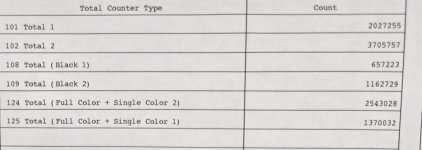
What is the copy count on this V1000 ? 101 or 102 meter please.

I have over 4 decades service experience with Canon. I have 35 plus with Canon color.
The print samples are terrible.
You have light prints, mottling, banding and uneven density. I also believe you have some fiery issues as well.
Canon test prints will show even the least slightest defects. Just keep that in mind.

First thing I would do is Turn on the environment switch. This turns on drum heaters to prevent early morning condensation.

All the quality issues would take me about 10 hours to trouble shoot. So many things are in play. I do think you have developer issues and/or drum issues. The auto gradation and color adjustments are way WAY off. And could be some fiery issues as well.
You need to keep heat on the servicing dealer and the sales rep. If no response then contact Canon district office and ask for Regional Manager.


All independent authorized Canon dealers are required to have 2 fully trained techs before they can purchase any office printing products.
 
Last edited:
Been a while since I direct operated a digital press. When I did it was a Xerox Versant 2100. If I had seen that I would have profiled the paper by doing a Laser Density Calibration for that sheet. Think I have the verbiage correct. It would print each colour on a sheet in a row with 0 in the middle and both sides of that move to +10 or -!0. You would pick the one that looked the cleanest. Really scrapping my brain on the exact procedure and naming of it, but that would in most cases let me adjust the lasers to get away from what you are showing in some of your images for the solid blues. Maybe Canon has something similar to achieve the same?
 
Been a while since I direct operated a digital press. When I did it was a Xerox Versant 2100. If I had seen that I would have profiled the paper by doing a Laser Density Calibration for that sheet. Think I have the verbiage correct. It would print each colour on a sheet in a row with 0 in the middle and both sides of that move to +10 or -!0. You would pick the one that looked the cleanest. Really scrapping my brain on the exact procedure and naming of it, but that would in most cases let me adjust the lasers to get away from what you are showing in some of your images for the solid blues. Maybe Canon has something similar to achieve the same?
I think that was the image voltage adjustment but I can't remember for sure, it's been a few years for me also with the Xerox v2100s. The Canon's don't have that functionality at all. So it's not relevant to this machine. The closest thing the Canon's have is the secondary transfer voltage but we only ever have to really adjust that when printing on plastic paper or if for some reason we are having a trailing edge deletion issue with a particular paper stock.
 
What is the copy count on this V1000 ? 101 or 102 meter please.

I have over 4 decades service experience with Canon. I have 35 plus with Canon color.
The print samples are terrible.
You have light prints, mottling, banding and uneven density. I also believe you have some fiery issues as well.
Canon test prints will show even the least slightest defects. Just keep that in mind.

First thing I would do is Turn on the environment switch. This turns on drum heaters to prevent early morning condensation.

All the quality issues would take me about 10 hours to trouble shoot. So many things are in play. I do think you have developer issues and/or drum issues. The auto gradation and color adjustments are way WAY off. And could be some fiery issues as well.
You need to keep heat on the servicing dealer and the sales rep. If no response then contact Canon district office and ask for Regional Manager.


All independent authorized Canon dealers are required to have 2 fully trained techs before they can purchase any office printing products.

Apologies for the delay. My notifications weren’t showing any activity, so I missed the replies. I’m going to start responding to each comment and testing the suggestions one by one.

I’ll reply directly to requests for more details and provide whatever info I can. I genuinely appreciate the help. Some of the technical suggestions are new to me, but I’ll ask clarifying questions and try everything that’s recommended.
 

Attachments

  • 20260128_094958.jpg
    20260128_094958.jpg
    141.4 KB · Views: 120
If this is who I think it is, I'm the printer 'down the road.' He is absolutely correct. The V1000 prints like absolute garbage. I am very happy with the quality of the C810 and the V700 I have. I can make a case the C810 actually prints a little better than the V700. That V1000 is junk and Canon has refused to make them whole. I would not ever recommend a V1000 to anyone and can certainly state that we came from Ricohs and the Canons print much better (the Ricohs banded terribly). But the samples that were brought to me off the V1000 were mottled and the color clarity was unsellable. It wasn't hard to beat those prints with either of my machines.
 
   
Back
Top