InDesign’s Data Merge

Fyshy

Active member
How can I apply master A to just odd pages? And master B to even pages? This would really help with smaller data merge file sizes. Thanks.
 
I have a script that inserts Master B every other page, but it doesn't look like a can post a .jsx file here. I don't know the first thing about creating scripts, but here's the text if I open it in Notepad. I'm not sure if that helps, maybe someone else can provide better direction.


var myPages = app.activeDocument.pages.length;

var ad = app.activeDocument;

for (var i = myPages-1; i>=0; i-- )

{

var myPage = ad.pages.add(LocationOptions.AFTER, ad.pages);

myPage.appliedMaster= ad.masterSpreads.item('B-Master');

}

 
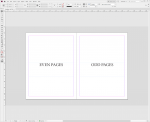
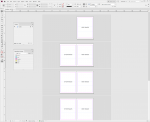
It's all A master. Just make the master page 2 pages - odd on the right, even on the left - and set your pages to facing pages. MasterPageA.pngResults.png

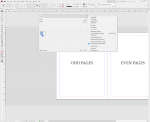
You can do it as non-facing pages as well. Make your master with odd on the left and even on the right. In the pages pallet, make sure "Allow Selected Spreads to Shuffle" is checked and "Allow Document Pages to Shuffle" is not checked. Then drag page 2 to the side of page 1 on the pages pallet.
SinglesMasterA.png
 
Last edited:
   
Back
Top