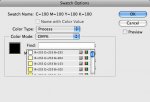
A client's designer apparently has a bug in Indesign CS3 (5.0.4, OS X). Attached is screen-shot. When "process" and "CMYK" are selected, I believe there should always be four sliders with 4 text boxes to choose a CMYK color, never a list of swatches. The list appears to be of web-safe RGB colors (a 6x6x6 matrix of 216 colors). "Name with Color Value" is disabled and unchecked, even though the swatch is named by the color values. There appears to be text covered by the list box, with an "M" on the left and four "6"'s on the right. The only apparent way she can create a new CMYK swatch is to make an object the desired color with the color palette, then Swatches>Add Unnamed Colors.
Has anyone seen or heard of this before?
Has anyone seen or heard of this before?