



gordo
Well-known member
The choice of halftone dot shape is important because it has an impact on the aesthetics of the final presswork as well as on the lithographic performance of the press. This post describes the basic dot shape options available with conventional "AM" halftone screening. The descriptions apply to all the various vendors' offerings – though there will be some very subtle variations between their various implementations.
When dots grow in size from highlight to shadow there is a point at which the dots first touch each other. When that happens there is an effect called the “optical bump.” In a gradient blend this may show up as an artifact of a dark line in an otherwise smooth blend. Another issue is that, because paper moves through a press from printing unit to printing unit, presses are effectively directional imaging devices. This means that halftone dots shapes that are also directional, can interact with the directionality of the press and may exaggerate some issues such as slur and doubling.
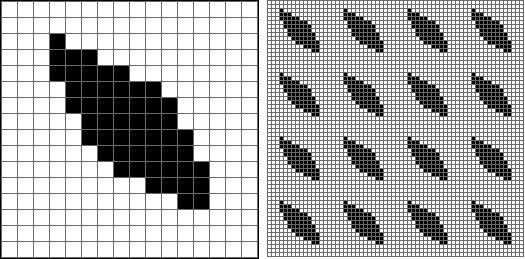
In an AM screen each dot is formed in a halftone cell, typically based on a grid of 16 by 16 pixels. The pixels within the cell are "turned on" in order to form the dot shape. The cells are then stitched together, like a mosaic, in order to form an area of dots.
On the left (enlarged) is a single halftone dot within its 16x16 pixel cell. On the right (reduced) is an area of dots within their 16x16 pixel cells.
Following are the basic AM screening dot shapes and their performance characteristics in use.
Click on the images to enlarge.
Round dot: Dots are round through the tone range

Benefits: Dot shape is the same for all screen angles and frequencies, optical bump is hidden in the shadows at the 75% tone, dot is non-directional so it is less affected by press problems. Reduces single channel moiré issues. Dot is non directional, i.e. all screen angle dots react the same to directional press issues such as slur and doubling
Issues: Not suited for film-imaged plates because the diamond shape that results at 75% and darker tones is very sensitive to dot gain and sudden loss of shadow detail. Excellent for computer-to-plate imaging because of the greater integrity of halftone imaging as well as the ease of dot gain compensation with tone reproduction curves.
Euclidean dot (a.k.a. Transforming Round Dot): Round/Square/Round

This is the classic dot shape that resulted from the original etched glass screens from the 19th century and is now replicated in digital form.
Benefits: Dot shape, except for 50% tint, is the same for all screen angles and frequencies, dot is non-directional so it is less affected by press problems. Shadow dots are less prone to dot gain - especially in a film workflow – than the simple Round dot.
Issues: Optical bump occurs at 50% midtone tint which puts it in the most important and visible image tones.
Elliptical dot (a.k.a. Transforming Elliptical Dot, Chain Dot): Rounded corner diamond shape

Benefits: Optical bump is moderated by being split into two – when the dots first touch at the long width at the 40% tint and then again at the short width at 60%.
Issues: Dot shape varies at different screen angles which can cause single color moiré and uneven dot gain. Dot is directional, at low lpi frequencies the “chaining” of the dots as two points touch can cause lines to appear as artifacts. Directional problems on press such as slur and doubling can cause strong tone and color shifts depending on the angle of orientation of the dots relative to the angle of the paper as it travels through the press.
Square dot: Square

Historically used for catalog work, letterpress, and specialty work.
Benefits: Gives an impression of a "sharper" looking image on press thus reducing the need for excessive sharpening in image editing applications.
Issues: Very prone to loss of shadow detail due to very thin spaces between shadow dots.
Line dot: Line

Historically used for newspaper work, lenticular, and specialty work.
Benefits: At lower screen rulings can have a strong graphic effect.
Issues: Directional problems on press such as slur and doubling can cause strong tone and color shifts depending on the angle of orientation of the lines relative to the angle of the paper as it travels through the press. Directional lines can introduce very visible subject moiré. Image edges can appear ragged.
Specialty dot:
Any custom dot shape designed to meet specific requirements.
Benefits: Halftone dot optimized for specific applications.
Issues: Requires extensive knowledge, development time, and testing in prepress and pressroom in order to implement.
Here are two examples:
Pepper Dot:

Uses small dots within larger conventional dots in order to reduce ink usage on press – especially for newspaper work. (Click on image to enlarge). Similar to surface pattering used in flexographic printing to increase solid Ink density on dots.
Novelty Dot: Uses a recognizable image or graphic to form the dot. (Click on image to enlarge)

When dots grow in size from highlight to shadow there is a point at which the dots first touch each other. When that happens there is an effect called the “optical bump.” In a gradient blend this may show up as an artifact of a dark line in an otherwise smooth blend. Another issue is that, because paper moves through a press from printing unit to printing unit, presses are effectively directional imaging devices. This means that halftone dots shapes that are also directional, can interact with the directionality of the press and may exaggerate some issues such as slur and doubling.
In an AM screen each dot is formed in a halftone cell, typically based on a grid of 16 by 16 pixels. The pixels within the cell are "turned on" in order to form the dot shape. The cells are then stitched together, like a mosaic, in order to form an area of dots.
On the left (enlarged) is a single halftone dot within its 16x16 pixel cell. On the right (reduced) is an area of dots within their 16x16 pixel cells.
Following are the basic AM screening dot shapes and their performance characteristics in use.
Click on the images to enlarge.
Round dot: Dots are round through the tone range
Benefits: Dot shape is the same for all screen angles and frequencies, optical bump is hidden in the shadows at the 75% tone, dot is non-directional so it is less affected by press problems. Reduces single channel moiré issues. Dot is non directional, i.e. all screen angle dots react the same to directional press issues such as slur and doubling
Issues: Not suited for film-imaged plates because the diamond shape that results at 75% and darker tones is very sensitive to dot gain and sudden loss of shadow detail. Excellent for computer-to-plate imaging because of the greater integrity of halftone imaging as well as the ease of dot gain compensation with tone reproduction curves.
Euclidean dot (a.k.a. Transforming Round Dot): Round/Square/Round
This is the classic dot shape that resulted from the original etched glass screens from the 19th century and is now replicated in digital form.
Benefits: Dot shape, except for 50% tint, is the same for all screen angles and frequencies, dot is non-directional so it is less affected by press problems. Shadow dots are less prone to dot gain - especially in a film workflow – than the simple Round dot.
Issues: Optical bump occurs at 50% midtone tint which puts it in the most important and visible image tones.
Elliptical dot (a.k.a. Transforming Elliptical Dot, Chain Dot): Rounded corner diamond shape
Benefits: Optical bump is moderated by being split into two – when the dots first touch at the long width at the 40% tint and then again at the short width at 60%.
Issues: Dot shape varies at different screen angles which can cause single color moiré and uneven dot gain. Dot is directional, at low lpi frequencies the “chaining” of the dots as two points touch can cause lines to appear as artifacts. Directional problems on press such as slur and doubling can cause strong tone and color shifts depending on the angle of orientation of the dots relative to the angle of the paper as it travels through the press.
Square dot: Square
Historically used for catalog work, letterpress, and specialty work.
Benefits: Gives an impression of a "sharper" looking image on press thus reducing the need for excessive sharpening in image editing applications.
Issues: Very prone to loss of shadow detail due to very thin spaces between shadow dots.
Line dot: Line
Historically used for newspaper work, lenticular, and specialty work.
Benefits: At lower screen rulings can have a strong graphic effect.
Issues: Directional problems on press such as slur and doubling can cause strong tone and color shifts depending on the angle of orientation of the lines relative to the angle of the paper as it travels through the press. Directional lines can introduce very visible subject moiré. Image edges can appear ragged.
Specialty dot:
Any custom dot shape designed to meet specific requirements.
Benefits: Halftone dot optimized for specific applications.
Issues: Requires extensive knowledge, development time, and testing in prepress and pressroom in order to implement.
Here are two examples:
Pepper Dot:
Uses small dots within larger conventional dots in order to reduce ink usage on press – especially for newspaper work. (Click on image to enlarge). Similar to surface pattering used in flexographic printing to increase solid Ink density on dots.
Novelty Dot: Uses a recognizable image or graphic to form the dot. (Click on image to enlarge)
Last edited:











