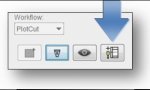
M monikam Registered Users Oct 9, 2017 #1 In Esko PlatePatcher, there is an icon in the upper right corner "Channel Editor" that is grayed out. How does this become active? Attachments photo6991.jpg 12.7 KB · Views: 432
In Esko PlatePatcher, there is an icon in the upper right corner "Channel Editor" that is grayed out. How does this become active?
PDL Well-known member Oct 9, 2017 #2 Go here. https://www.esko.com/en/Support. Select Product Documentation. Type 'PlatePatcher' in the search field. If you select the version 16 of the PlatePatcher manual your answer is on page 8.
Go here. https://www.esko.com/en/Support. Select Product Documentation. Type 'PlatePatcher' in the search field. If you select the version 16 of the PlatePatcher manual your answer is on page 8.