


Hi!
When printing orienteering maps the biggest issue and problem is getting the smallest contour lines sharp and dense. The colour is brown ( a mixture of CMY) and those lines can be as thin as 0,11mm.
The best results I’ve seen are from maps printed by laser printers with a physical resolution of 2400x2400dpi. (Of course offset is best)
I’m using an OKI pro 9431 with 1200x1200 resolution and I’m happy with the print results except for the thinnest lines.
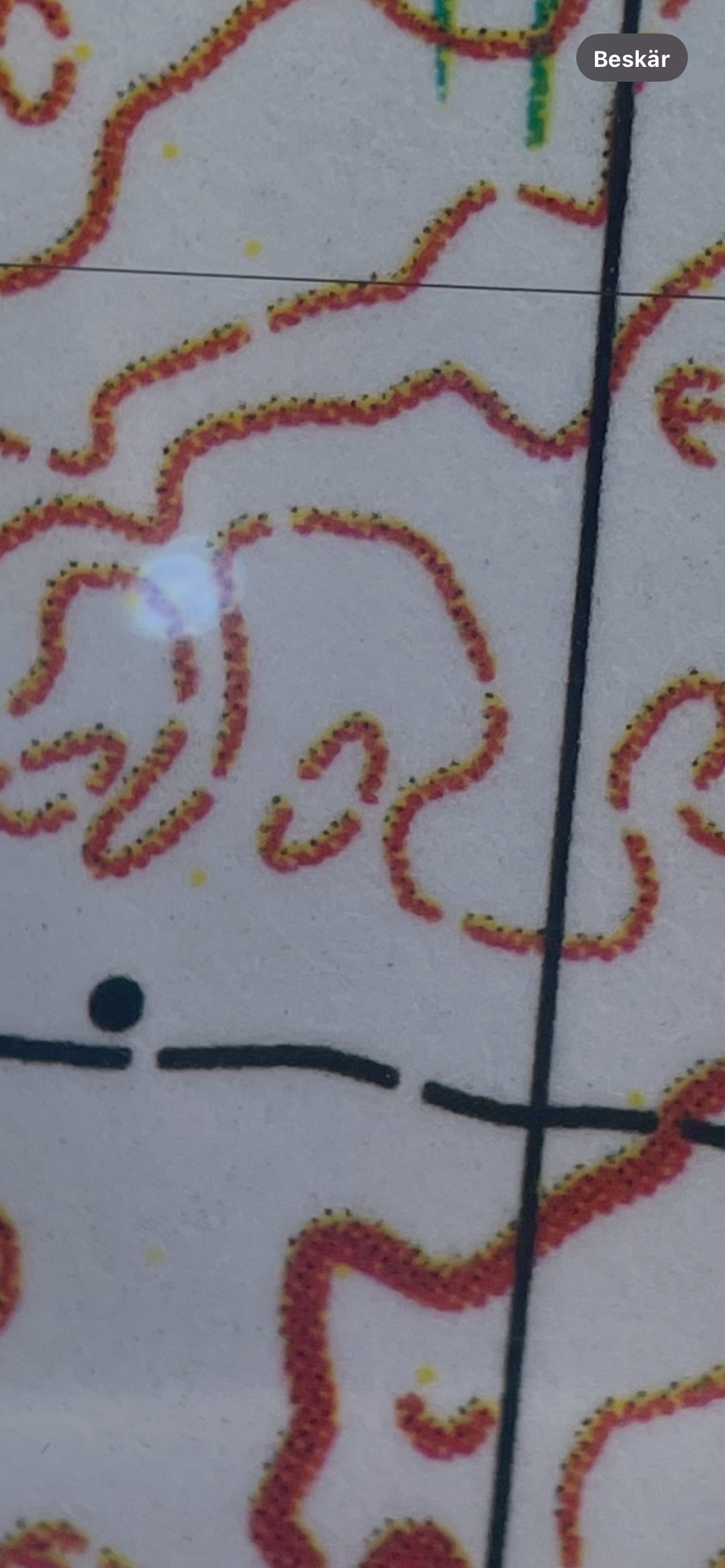
When I look at the contours through an 10x augmentation glass they appear as on the picture below. Yellow a little bit offset and the edges of the lines are not sharp. Is there a good way to correct this?
Better rastering by a rip software? Which one and what function?
I print pdf:s from Acrobat reader with PosttScript driver…
Thanks for any tips!
Patrik
When printing orienteering maps the biggest issue and problem is getting the smallest contour lines sharp and dense. The colour is brown ( a mixture of CMY) and those lines can be as thin as 0,11mm.
The best results I’ve seen are from maps printed by laser printers with a physical resolution of 2400x2400dpi. (Of course offset is best)
I’m using an OKI pro 9431 with 1200x1200 resolution and I’m happy with the print results except for the thinnest lines.
When I look at the contours through an 10x augmentation glass they appear as on the picture below. Yellow a little bit offset and the edges of the lines are not sharp. Is there a good way to correct this?
Better rastering by a rip software? Which one and what function?
I print pdf:s from Acrobat reader with PosttScript driver…
Thanks for any tips!
Patrik
Last edited:










