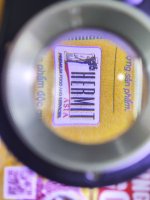
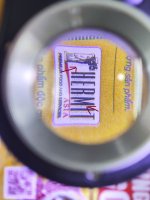
Please define what you think the "problem" is?
Are you talking about the edge definition of black type?
It's been screened, perhaps to show a drop shadow artistic design?
Please define what you think the "problem" is?
Are you talking about the edge definition of black type?
It's been screened, perhaps to show a drop shadow artistic design?
Thank you for reply but it not our design
We fix the prolem by cleaning the ITB sensor that read the belt speed, it reduce but still have a very thin shadow leave behind, i think that my belt roller is too worn
"have a very thin shadow leave behind,"? please define this better.
I think he is referring to the screening behind the text in the middle of the image. It's an image and not really saved as text that's the backround when the image was created or art scanned. How does it looko at 100% and not from the loop?
"have a very thin shadow leave behind,"? please define this better.
I think he is referring to the screening behind the text in the middle of the image. It's an image and not really saved as text that's the backround when the image was created or art scanned. How does it looko at 100% and not from the loop?
when look at 100% it look like a dirty messy of black dot, in the case of this file it doesn't affect the whole thing but there are files with a lot of text and small black lines that make it feel like the backgroun is dirty
"have a very thin shadow leave behind,"? please define this better.
I think he is referring to the screening behind the text in the middle of the image. It's an image and not really saved as text that's the backround when the image was created or art scanned. How does it looko at 100% and not from the loop?
why is the problem with the artwork?
because i have this issue just 3 month ago and one month after changing the itb, back then it was fine
it a bit better after i clean the itb sensor (the one that read the silver coat under the belt)
The black dots looks like screening from a color separation of a picture. Open the file on screen zoom way in and I'll bet the dots are there. You could also type the letters (same font size) define them as the same color as you printed the sample and print with the same settings, paper, and machine. Post the results.
If it really is your machine, flip the image 180. If it's the machine causing it, the black dots should be on the other side of the text. If they don't move, it would indicate it's in the file and not a print defect.
If it really is your machine, flip the image 180. If it's the machine causing it, the black dots should be on the other side of the text. If they don't move, it would indicate it's in the file and not a print defect.
I did exactly what you said and it wasn't the file.
but i found out that increase the image transfer current of black seem to reduce the problem, so far i only had this issue on light stock and label