How Many Tries??

TJPrinter

Well-known member
The file you receive for a job is wrong, so you explain what needs to be corrected. Customer makes changes and sends back the file again and it’s not right, explain again and they send it back again and it’s still not #### right! The sad part is most of these jobs are small jobs that could have been completed in the time it takes to go back and forth with emailing.

This back and forth is time consuming and a waste of time, so at what point do you just attempt to fix the file and simply bill for the time? Explain nicely after the failed second attempt, third attempt?
 
Hey TJPrinter,

I feel your pain - we're building a solution to this very problem.

With Artworker you can request artwork from your customer, and our software will check and feedback common issues at the point of upload.

This way your customer can check their artwork as many times as they like before it even lands with you.

I'd love to get your feedback if you'd like a demo?

Thanks,
Nate
 
Last edited:
Some customers get it, most don’t. New customer - try to educate them and see if they are malleable. Old customer that has demonstrated general file illiteracy…just fix it and bill them. As you say, it often takes more time to explain + back and forth, to even try to get something fixed…than to fix. And at the end of the day, it is probably cheaper and much less time consuming for the customer to have us fix it on the first try, than to pay their person to try to fix and pay us to go through however many rounds of files. Many times I just have to assume that the files they send are the best available, and we are the final stop….if they had better files they would have sent them.

I find it amusing, we have a trade partner for big jobs, and they truly kick back everything from our customers, the absolute simplest fixes. The mistake being our CSR sends jobs direct to them, and doesn’t allow me to preflight first. They must have a prepress department, don’t know what they actually do, but must all day just write complaints. Everyone runs their business their own way, but can you imagine if you had someone at the auto service center kicking back to every customer “don’t you have a better car available for us to work with?”
 
The file you receive for a job is wrong, so you explain what needs to be corrected. Customer makes changes and sends back the file again and it’s not right, explain again and they send it back again and it’s still not #### right! The sad part is most of these jobs are small jobs that could have been completed in the time it takes to go back and forth with emailing.

This back and forth is time consuming and a waste of time, so at what point do you just attempt to fix the file and simply bill for the time? Explain nicely after the failed second attempt, third attempt?
Need more details because it depends on what the issue is and if you can resolve it yourself relatively quickly. Sometimes it's easier to ask for their native file if you can't do it on their PDF. If I have a repeat offender, I might do a quick screen-share to show them how to do it themselves. This usually results in the biggest ah-hah moment for them and future files are better.
 
Working for a school district, our customers can barely comprehend simple concepts like booklets need to be in increments of 4 pages, let alone understand how to fix a bleed... I was hired specifically as Pre-Press with the ability (and with the correct tools) to edit/tweak/correct PDFs. Some times I'm able to kick jobs back documents to get fixed, but more often than I'm having to dissect a PDF into its components to find the errant object or outline a font that was improperly embedded (cough Canva cough). The native tools in PitstopPro are game changers.

I avoid native files due to lacking fonts and source graphics... again, they don't understand how to properly build a document let alone how to package/gather their files for sharing.

Good tools to have/know (I can fix just about anything)
Acrobat Pro
+Pitstop Pro v19 or newer
+Quite Imposing
Adobe Illustrator, InDesign, Photoshop
(God mode enabled if you have GhostScript and know how to use it)
 
Working for a school district, our customers can barely comprehend simple concepts like booklets need to be in increments of 4 pages, let alone understand how to fix a bleed... I was hired specifically as Pre-Press with the ability (and with the correct tools) to edit/tweak/correct PDFs. Some times I'm able to kick jobs back documents to get fixed, but more often than I'm having to dissect a PDF into its components to find the errant object or outline a font that was improperly embedded (cough Canva cough). The native tools in PitstopPro are game changers.

I avoid native files due to lacking fonts and source graphics... again, they don't understand how to properly build a document let alone how to package/gather their files for sharing.

Good tools to have/know (I can fix just about anything)
Acrobat Pro
+Pitstop Pro v19 or newer
+Quite Imposing
Adobe Illustrator, InDesign, Photoshop
(God mode enabled if you have GhostScript and know how to use it)
I run Imposition Studio instead of Quite Imposing. Everything else is right there.
 
We used to have the same problem. We were giving customers a choice between our "fix it for me" and "I will fix it" option and charging more for the "fix it" option. Unfortunately, the people who were selecting the "I will fix it" were costing us MORE time and money than the "fix it for me" group.
  1. People who didn't know what they were doing and wanted to save money.
  2. People who did know what they were doing and wanted to fix their own stuff.
So we decided to actually take the opposite approach, we charge customers for the "fix it" price upfront (it's a lower price because everyone pays it so we can average the cost over all orders). We then give the customer an option to opt out of our "Fix it" program. When they opt out of the program we still charge them (so there's no incentive to save money) but post a message letting them know that by opting out they are delaying their orders because we have to spend time writing a bunch of emails explaining the problem.

The opt-out group is now either:
  1. People who don't know what they're doing but think they do - If they end up being dunderheads who don't know how to fix the problem we can just say: "no problem" just choose "fix it for me" next time since it's included in your order price. If they're teachable we teach them how to fix it.
  2. People who actually do know what they're doing and quickly fix their files and send it back.
Either way, I'm less mad at them because they're paying to fix it already.

Here is the wording we use when they try to select "I will fix it"
I will fix it: (NOT RECOMMENDED) - Asking for corrected files takes time as we have to write a detailed email explaining the problem and the fixes required. E-Mails are handled AFTER production, so this may results in a delay of at least one day before you will even be aware that the order has been delayed.

 
Working for a school district, our customers can barely comprehend simple concepts like booklets need to be in increments of 4 pages, let alone understand how to fix a bleed... I was hired specifically as Pre-Press with the ability (and with the correct tools) to edit/tweak/correct PDFs. Some times I'm able to kick jobs back documents to get fixed, but more often than I'm having to dissect a PDF into its components to find the errant object or outline a font that was improperly embedded (cough Canva cough). The native tools in PitstopPro are game changers.

I avoid native files due to lacking fonts and source graphics... again, they don't understand how to properly build a document let alone how to package/gather their files for sharing.

Good tools to have/know (I can fix just about anything)
Acrobat Pro
+Pitstop Pro v19 or newer
+Quite Imposing
Adobe Illustrator, InDesign, Photoshop
(God mode enabled if you have GhostScript and know how to use it)
The native tools in PitstopPro are game changers.
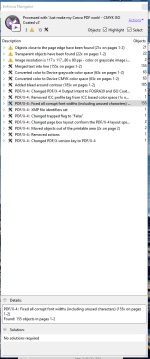
Indeed they are. Not to mention that in the last 25.03 release, we also added a default preflight profile that addresses Canva PDF files specifically :)
 
We used to have the same problem. We were giving customers a choice between our "fix it for me" and "I will fix it" option and charging more for the "fix it" option. Unfortunately, the people who were selecting the "I will fix it" were costing us MORE time and money than the "fix it for me" group.
  1. People who didn't know what they were doing and wanted to save money.
  2. People who did know what they were doing and wanted to fix their own stuff.
So we decided to actually take the opposite approach, we charge customers for the "fix it" price upfront (it's a lower price because everyone pays it so we can average the cost over all orders). We then give the customer an option to opt out of our "Fix it" program. When they opt out of the program we still charge them (so there's no incentive to save money) but post a message letting them know that by opting out they are delaying their orders because we have to spend time writing a bunch of emails explaining the problem.

The opt-out group is now either:
  1. People who don't know what they're doing but think they do - If they end up being dunderheads who don't know how to fix the problem we can just say: "no problem" just choose "fix it for me" next time since it's included in your order price. If they're teachable we teach them how to fix it.
  2. People who actually do know what they're doing and quickly fix their files and send it back.
Either way, I'm less mad at them because they're paying to fix it already.

Here is the wording we use when they try to select "I will fix it"
I will fix it: (NOT RECOMMENDED) - Asking for corrected files takes time as we have to write a detailed email explaining the problem and the fixes required. E-Mails are handled AFTER production, so this may results in a delay of at least one day before you will even be aware that the order has been delayed.

This is great! I like this approach.
Thank you for the detailed write-up.
 
Need more details because it depends on what the issue is and if you can resolve it yourself relatively quickly. Sometimes it's easier to ask for their native file if you can't do it on their PDF. If I have a repeat offender, I might do a quick screen-share to show them how to do it themselves. This usually results in the biggest ah-hah moment for them and future files are better.
I never touch native files, if I can't fix the issue(s) in a pdf with Pitstop, Acrobat or Quite, then I can't fix it.
 
The native tools in PitstopPro are game changers.
Indeed they are. Not to mention that in the last 25.03 release, we also added a default preflight profile that addresses Canva PDF files specifically :)
wait... what... I JUST upgraded from v19 to v25 (it was painful going from a perpetual license to a subscription)... @loicaigon please more details
 
Last edited:
I love Kodak insite. They upload files to their Job number it rips and proofs files before prepress has to get involved. Best Part, rip fails produce a proof and rejects the offending file. They get to argue with a computer!

Expensive solution, but great entertainment
 
wait... what... I JUST upgraded from v19 to v25 (it was painful going from a perpetual license to a subscription)... @loicaigon please more details
@loicaigon nevermind, I had 24.11, upgraded to 25.3 and found it! OMG, it fixes so many annoying problems!!!
 

Attachments

  • CANVA fix.PNG
    CANVA fix.PNG
    91.5 KB · Views: 209
Customer makes changes and sends back the file again and it’s not right, explain again and they send it back again and it’s still not #### right!
I found it to be less grief just to make corrections myself and have done with it, rather than go back & forth trying to explain and still not having the file properly corrected. Presuming fixes were relatively simple. I wouldn't charge for small fixes. But if it became habitual (same customer) I'd make them aware and then gradually increase pricing if issues persisted.
 
I found it to be less grief just to make corrections myself and have done with it, rather than go back & forth trying to explain and still not having the file properly corrected. Presuming fixes were relatively simple. I wouldn't charge for small fixes. But if it became habitual (same customer) I'd make them aware and then gradually increase pricing if issues persisted.
That's a pattern I have often seen indeed. For recurring B2B customers, some printers try to educate them because it's a win/win. For B2C, trying to educate is not worth the effort (and the margin). This is where automation can really help to mimimize impact on operators.
 
not worth the effort (and the margin).
I should point out that my situation was a little more unique. After years working on the shop floor I started working from home. Essentially brokering. I hate that term (it makes me sound like a sales person). So my time was my own.
My methods wouldn't necessarily work in a higher production type situation (normal shop). I gave away too much of my time, but it also made for a more peaceful life, not having to debate with customers the merits of up-charging for minor fixes.
I'm now retired and still check in here occasionally to reaffirm that decision to retire ;)
 
   
Back
Top