Pitstop Pro - Forcing either single page or current page programmatically?

EdwardB

Well-known member
Pitstop Pro Question.

Creating a Pitstop Action that replaces the font(s) only on a current page (ideally), or even only the 1st page, regardless of what is selected for "Run On"?

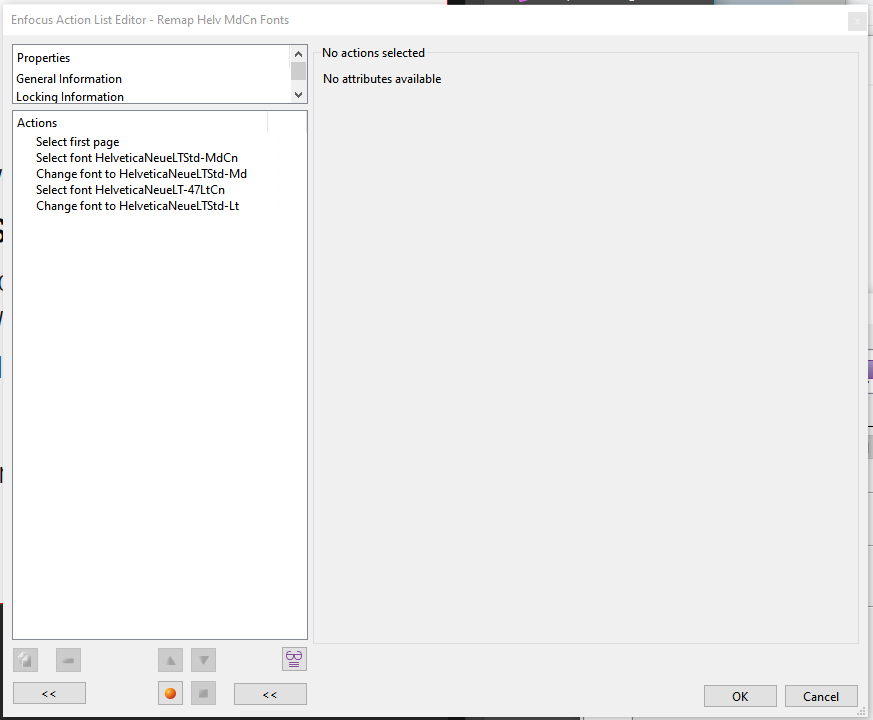
I have "Select First Page", then select & replace the necessary fonts. Even though only one page (first page) ever gets selected, it still processes the entire document. I know I can change "Run On" to current or selective page number, its extra clicks i'm trying to avoid, plus the oops factor of forgetting to change it.
1757103458785.png
 
Your problem is actually coming from your selection and how you believe it works.

When you do:
  • Select first page
  • Select font
You actually change the first page selection to the font selection that can be found anywhere.
Hence your problem.

What you need here is to tie both selections with a AND operator.

  • Select first page
  • Select font "xxx"
  • AND
  • Change font

Then changes will only occur on page 1 given that "Run on" is set to work on complete document, or if current page is first page, or if Page range is set to 1.
In other cases, nothing will happen.

Loic
 
What you need here is to tie both selections with a AND operator.

  • Select first page
  • Select font "xxx"
  • AND
  • Change font
thank you! I knew something about their logic syntax was eluding me.

do you know where they have their logic syntax documented? I can't seem to find it in their online docs. I would really love to know if they had some form of "if then else"
 
thank you! I knew something about their logic syntax was eluding me.

do you know where they have their logic syntax documented? I can't seem to find it in their online docs. I would really love to know if they had some form of "if then else"
Hi,
Yes you can certainly find documentation about logical operators here: https://cdn-www.enfocus.com/manuals...en-us/common/ppr/concept/co_actions_tips.html
And as a user, you can access the learning platform where there are hundreds of hours of workshops (recorded webinars if you like) where such operators have been explained in details.
See here:
But in a nutshell, everything in PitStop starts from a selection and any selection may discard the previous one (as you had earlier). Logicial operators help combining multiple selections and tie them together.
There is no IF/ELSE mechanism as such, but most of the time there is no need. Because what really matters is what is the selection you really need. If a selection is valid, actions operate. If it's not valid, actions do not operate. In other words, IF a selection is valid, do something. The ELSE here is either unnecessary or just consists in another Selection.
We may come with such IF/ELSE some day but like I said, in 99% of the time, you simply don't need it.
 
Is there a way via Action List to select the CURRENT page regardless of which page is being viewed (and without having to select ‘Current Page' in 'Run On')?
 
Is there a way via Action List to select the CURRENT page regardless of which page is being viewed (and without having to select ‘Current Page' in 'Run On')?
Well, the "current" page is something of a viewing experience. How would an Action now about what is the "current" page as selected inside Acrobat.
And even if we did allow this by some means, how would that behave in PitStop Server?
 
not everyone runs pitstop server ;)
Yes but I would really hate that something would work differently based on if ever this is run on Pro or in Server.
Imagine you end up using PitStop Server, woudln't that be nice that this is as smooth as possible in terms of process?

Having something that runs on current page is basically an Action List that works for all pages but restricted by Run on "Current Page".
Of course, there are differences such as Manual tools in Pro but again, I wouldn't want something (Action List or Preflight Profile) that can be run only in Pro or in Server (ok Variable Sets excluded :P )

But feel free to come back with a use case that I couldn't argue ;)
 
But feel free to come back with a use case that I couldn't argue ;)
@loicaigon Here is the problem I run into over and over again with files I receive from our science department. I need to constantly crop out "cards" off a page, then immediately turn around and treat the individual pages where the remaining content is removed and media\trim boxes are changed to the selection. Otherwise as "croppied" pages in a document to either split (tile) them into individual cards, Quite Imposing will reveal the hidden content and improperly separate the cards. This is my Workflow as it stands:

  1. Select "Cards" on the page:
    1767986717261.png
  2. Change to "User Selection":
    1767986825947.png
  3. Crop to Selection:
    1767986900089.png
  4. Repeat Crop to Selection for all pages in document...
  5. Change back to "Complete Document"
  6. Perform cleanup operation that removes extraneous objects and modifies Media\Trim Boxes for all of the pages
    1767987078568.png
Since the process of selecting the cards on a page can't really be automated... Sometimes each page will have a different number of cards, often they are on different areas on the page, and sometimes they are different sizes. But if I could complete all of the above on one page instead of multiple steps

Now having to tile each page individually in Quite Imposing is a task in itself... but I digress.
 

Attachments

  • 1767986866759.png
    1767986866759.png
    48 KB · Views: 84
"Since the process of selecting the cards on a page can't really be automated..." I see in your picture that there is a kind of a dotted line around images, couldn't that used to select your cards?

Feel free to send me a PDF at loica at enfocus com.
 
I tried combining the two operations, but actions like the removal of objects outside of the media box are ignored because they aren't selected and thus not removed. After resizing the cropped page, if necessary to unify card sizes, content that should have been removed is being revealed.
1767988944148.png
 
Based on the files you sent me, I believe this is perfectly doable. The thing is that you have images that are some alone, others accompanied by a title.
Both cases can be covered by
Select texts [2 actions for font +point size]
Select Images
OR
Then resize;
That will resize to images and title if found.
 
   
Back
Top