

You are using an out of date browser. It may not display this or other websites correctly.
You should upgrade or use an alternative browser.
You should upgrade or use an alternative browser.
printing envelopes on iridesse
- Thread starter Gal
- Start date
We do have inkjet envelope printer but we had the idea that the xerox will replace it and i could drop the machine and make spaceGuessing the OP is talking in CM.
Wrinkles are well known issue, not really seen any good solutions for that. Some have gotten it down to the only wrinkle being on the trailing flap but its still there.
That is why I love my inkjet for envelopes.
I tried everything still comes out wrinkle very much really annoyingAdjust fuser temperature belt side & pressure roll side. Change gsm setting for the stock. We have different profiles depending on the brand of envelopes we're running.

wonderings
Well-known member
Fuser temperature is what I did on our old Versant and I think the print technology is somewhat similar. I have seen envelopes running on an Iridesse with no problem so it can be done. Are you sure your paper settings are all correct? If you are in spec for what the printer does you could also contact service, or get training and let them show you how to properly run them.
I try every settings on this printer trust me i try lower the fuser temp and lower the pressure and GSM everythingFuser temperature is what I did on our old Versant and I think the print technology is somewhat similar. I have seen envelopes running on an Iridesse with no problem so it can be done. Are you sure your paper settings are all correct? If you are in spec for what the printer does you could also contact service, or get training and let them show you how to properly run them.
The service says it cannot be done at all only envelopes size 11X23 and 18X25 that's it
When they sold us the machine they said, Yea it can run we can do stuff to fix it and shit like this
Stickman42
Well-known member
I don't run a lot of envelopes on my Iridesse, but when we have to run 9" x 12" 28# booklet peel and seal, they run fine and without wrinkles.
I think you've got to try other brands of envelopes before you can confidently say it's the machine's fault.
I think you've got to try other brands of envelopes before you can confidently say it's the machine's fault.
wonderings
Well-known member
What does the spec sheet say for the press? If the spec sheet from Xerox says it should do it then you have to keep pushing Xerox service to make it work.I try every settings on this printer trust me i try lower the fuser temp and lower the pressure and GSM everything
The service says it cannot be done at all only envelopes size 11X23 and 18X25 that's it
When they sold us the machine they said, Yea it can run we can do stuff to fix it and shit like this

jwheeler
Well-known member
Sales reps in any industry will lie (or bend the truth) just to get a sale. If something is an important selling factor (like running envelopes), ask to see the spec sheet during the sales process and also run it during the demo next time. I agree with @wonderings, ask for the spec sheet now to see if you have more ammo on your side, and also ask for an approved media guide (some vendors call it a 'substrate throughput assurance guide). If those size envelopes are in there, they should make it work. They may also insist you buy digital rated envelopes. For the 11x23, that's similar to our #10 size...we have to buy side-seam (instead of the diagonal seam) for best results on our KM's.When they sold us the machine they said, Yea it can run we can do stuff to fix it
Have you tried rotating the envelope (90 degrees, or 180 degrees)?
Stickman42
Well-known member
@jwheeler hit the nail on the head. I remember a salesman saying years ago "you can run the wheels off this machine", in reference to the volume we predicted. The service tech almost fainted when he saw the meter reading for the first time.
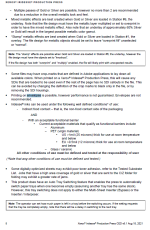
Xerox puts out a CED - Customer Expectations Document - for their equipment. I found this to be much more realistic with regards to how the machine will perform at a minimum. Attached is the page from the Iridesse CED that addresses envelope printing. It's not a long read, lol! I did find a Recommended Media List online, and there was not a single envelope on there. That being said, we do successfully run envelopes, but not EVERY envelope will be trouble-free. Ironically, the Iridesse high-capacity feeder has the envelope guide attachment included
Xerox puts out a CED - Customer Expectations Document - for their equipment. I found this to be much more realistic with regards to how the machine will perform at a minimum. Attached is the page from the Iridesse CED that addresses envelope printing. It's not a long read, lol! I did find a Recommended Media List online, and there was not a single envelope on there. That being said, we do successfully run envelopes, but not EVERY envelope will be trouble-free. Ironically, the Iridesse high-capacity feeder has the envelope guide attachment included
Last edited:
jwheeler
Well-known member
Oof! "Envelopes are not recommended"Attached is the page from the Iridesse CED that addresses envelope printing. It's not a long read, lol!
Ya I’ve learned that the sales reps bend the truth. My Konica ended up having “no fix” for the wrinkle issue except for me to open the flap. Now my issue is that the feeder doesn’t really work well with the flap open. So now they’re trying to figure that out. This is all while paying for a very expensive “envelope” fused.
jwheeler
Well-known member
Do you use the side-seam envelopes instead of the traditional diagonal-seam? We run envelopes on our C6085, C7090, and 6136's with minimal-to-no visible wrinkles (with the envelope fuser on all 3). We could never get rid of it with the diagonal flaps.Ya I’ve learned that the sales reps bend the truth. My Konica ended up having “no fix” for the wrinkle issue except for me to open the flap. Now my issue is that the feeder doesn’t really work well with the flap open. So now they’re trying to figure that out. This is all while paying for a very expensive “envelope” fused.
Hey everyone
Thank you for the answers
Yes we made it printing envelopes with the machine
We just bought envelopes from another supplier and it goes very good with wrinkle so small customer wont see
I found out that the problem with envelopes is that they must produce in a specific way and paper direction so it can run smoothly in the machine
Thank you for the answers
Yes we made it printing envelopes with the machine
We just bought envelopes from another supplier and it goes very good with wrinkle so small customer wont see
I found out that the problem with envelopes is that they must produce in a specific way and paper direction so it can run smoothly in the machine
Similar threads
- Replies
- 3
- Views
- 639
- Replies
- 28
- Views
- 3K

- Replies
- 2
- Views
- 536





