CanonIX 3200i w/ Prisma Trying to run NCR

w8ing4nite

Member
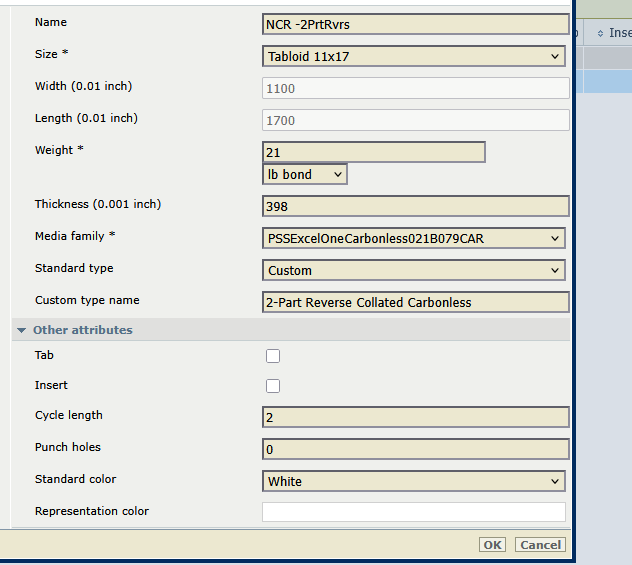
Anyone have some settings available to share for NCR? I have a media profile from Think.com before they cleared all their specialized profiles. But when I adjust the cycle length, it still doesnt pick up where is left off when I have a jam. My job is NON variable, 2part NCR. 2nd sheet differs from first sheet. It DOES show as mixed media when applied to my job.

I dont jam alot but we are getting really large runs and want piece of mind that it will pick up where is left off. If not Ill just do it the old fashioned way....blah


Thanks in advance - Nite
1755617778553.png
 
Haven't used an iX, but I used Prisma on a Varioprint 6320 for about 10 years. I always duplicate my pages for NCR jobs. So 2 pages for 2part, 3pages for 3part. I'm not sure if the cyclic media function will work otherwise. If it did jam it would always kick out the bad sheets to the purge tray and then have me confirm in the paper tray that everything was correct before it resumed printing.
 
hmm, well I mispoke it seems, changing my cycle count, (so knows my media is precollated) worked for this job. It DID spit out paper when I tested to resume correct sheet. My problem was with variable data, like consecutively numbered receipts and such. I will repost when I get to another variable and i DID write down what you said, I used to have to do that for Fiery...I completely forgot. Thanks!!
 
I've never gotten variable data to work with the cycle count on any of my Oce/Canon devices. I have a separate media I call "NCR_2Part-2", that purposely has the cycle count set to '1' and we have to manually fix the next sheet in the tray based on the last sheet out of the machine during a jam.
 
I've never gotten variable data to work with the cycle count on any of my Oce/Canon devices. I have a separate media I call "NCR_2Part-2", that purposely has the cycle count set to '1' and we have to manually fix the next sheet in the tray based on the last sheet out of the machine during a jam.
yah understood, I was hoping there was something I was missing. SMH...oh well..we have two others machines for variable that can do NCR. At least all my big jobs are not variable...just mixed media. I accomplish that with cycle counts or I create JDF ticket .... Oh well ;-)
 
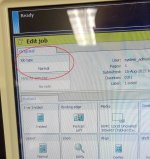
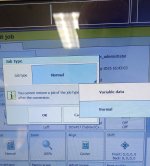
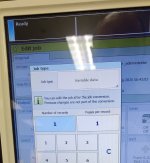
Not sure what the Prisma Controller looks like on the iX, but on the Canon we have you can set up variable data and page counts per set. I've honestly never used it, but it should make cyclic media work properly.
 

Attachments

  • 1.jpg
    1.jpg
    385.2 KB · Views: 146
  • 2.jpg
    2.jpg
    393.9 KB · Views: 149
  • 3.jpg
    3.jpg
    333.9 KB · Views: 146
Not sure what the Prisma Controller looks like on the iX, but on the Canon we have you can set up variable data and page counts per set. I've honestly never used it, but it should make cyclic media work properly.
hmmm, I wrote that down too... I played with that about a year ago, but most of our variable data is predone before sending. Until multimedia jobs came into play, then needed JDF to set different media to pages in seperate drawers. I will play around with the variable feature tomorrow. ;-)
 
Not sure what the Prisma Controller looks like on the iX, but on the Canon we have you can set up variable data and page counts per set. I've honestly never used it, but it should make cyclic media work properly.
ohhhh interesting... I wil have to give this a try the next time I'm doing VDP on our B&W. We too do our VDP offline and send it to the machine as a whole job.
 
hmmm, I wrote that down too... I played with that about a year ago, but most of our variable data is predone before sending. Until multimedia jobs came into play, then needed JDF to set different media to pages in seperate drawers. I will play around with the variable feature tomorrow. ;-)
I've done a lot of variable data. ALL of it pre-printed to PDF. Send PDF to print. Sucks trying to do variable, live on line. Prepared PDF allows you to see actual results before print a dozen pieces wrong. Esp. on IX with it super long paper path.
 
   
Back
Top