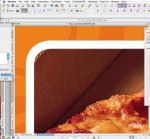
As MacTwidget implies the stroke position set to "inside" makes the outer edge of the stroke the same as the edge of the image, with rounding off, you may get such artifacts. The old standard used to be centred strokes, and that for a reason.
One way to get around it is to first apply a centred stroke and then paste into an outer stroke, but work arounds aren't allways slick.
What is your trapping setting? (is it PDF trapping or in rip?) Some set trapping to images always swell, and that isn't IMHO appropriate with modern design. I consider trapping should treat images and objects according to same rules.