Ricoh 9200 skewed

slimbh

Well-known member
Hi,
Our Ricoh 9200 strat print skew (5mm) since some weeks, No fiery, machine setting is working. When tech fix it, it start working for some hundred sheet then the skew is coming back. Even tech don't find how to fix it.
Any body can help?
Thanks,
 
So we run two 9210s in house and its unfortunately a very common issue with these machines. Believe it or not it's not actually a skew with the machine its a magnification issue with high density on either side if its duplexed. Essentially what's happening is its laying down so much toner on one side that when it passes through the fuser again its being warped by just a small amount. This causes the machine to try to overcompensate and leads to what you perceive to be skew.

With every affected paper stock heavy stock tends to be the worst culprit you'll need to manually adjust the magnification on one side of the sheet. Grab a mm ruler and print out a duplexed solid image and measure each side. Whichever side is slightly larger is the one you'll need to manually adjust. This is a temporary fix with that specific paper stock. Avoid running the auto adjustment for that paper stock again after doing manual adjustments.

We rarely have to touch our registration once its adjusted, but remember this is a machine and shit does fall out of wack every once in a while! Hope this helps! Sorry for the hard read im trying this from my phone

 
So we run two 9210s in house and its unfortunately a very common issue with these machines. Believe it or not it's not actually a skew with the machine its a magnification issue with high density on either side if its duplexed. Essentially what's happening is its laying down so much toner on one side that when it passes through the fuser again its being warped by just a small amount. This causes the machine to try to overcompensate and leads to what you perceive to be skew.

With every affected paper stock heavy stock tends to be the worst culprit you'll need to manually adjust the magnification on one side of the sheet. Grab a mm ruler and print out a duplexed solid image and measure each side. Whichever side is slightly larger is the one you'll need to manually adjust. This is a temporary fix with that specific paper stock. Avoid running the auto adjustment for that paper stock again after doing manual adjustments.

We rarely have to touch our registration once its adjusted, but remember this is a machine and shit does fall out of wack every once in a while! Hope this helps! Sorry for the hard read im trying this from my phone

Thank you for your answer.
We have two machines. one is Ok and other one print skew badly. Tech remove entire registration unit from skewed machine and put it into machine print right. The skew appear. They say its registration unit issue but they can't precise exactly which component make this issue.

Skew appear on any paper type or weight.
 

I can second LeGerbs comment on Magnification issues on these machines.​

All though is sounds as you may have a combination of both unit issues and magnification. Ive actually had luck with adjusting registration while job is running. Yes it takes extra sheets you may not have but on reallly problem stock i found it holds better through out the run if i take the time on the first 50 ish sheets to tighten it up. That sounds crazy in digital world where jobs may not even be 50 sheets total so it may not always be an option. In your case after 100ish sheets something is changing. If you could try changing it while running maybe that can help you get by untill the tech figures out the underlying issue.​

I

 
Every digital unit has some skew or stretch because of the heat affecting the paper. My Ricoh 9210 is a huge improvement over any canon or KM I've had. I don't see that as the issue here with 2 machines in close proximity 1 runs, 1 skews and you swap the registration unit AND the problem follows. __ Replace the Unit!!__ I couldn't afford to be someones ginny pig waiting for them to find which roller or bearing or motor or board. Make them replace the whole unit! Thats what a click charge is for. Service on the machine and having a good relationship with your techs is more important than make or model IMHO.
 
Every digital unit has some skew or stretch because of the heat affecting the paper. My Ricoh 9210 is a huge improvement over any canon or KM I've had. I don't see that as the issue here with 2 machines in close proximity 1 runs, 1 skews and you swap the registration unit AND the problem follows. __ Replace the Unit!!__ I couldn't afford to be someones ginny pig waiting for them to find which roller or bearing or motor or board. Make them replace the whole unit! Thats what a click charge is for. Service on the machine and having a good relationship with your techs is more important than make or model IMHO.
I'm not on click charge contract. I bought two machines and pay for any unit replaced. So before putting more money I would like to know if it will fix the issue.
 
No click contract makes a huge difference. The fact that the issue follows 1 unit between 2 machines really narrows down the parts need but that does not make it cheap. I can't help with internal components of the registration unit, Sorry and good luck.
 
Hi,
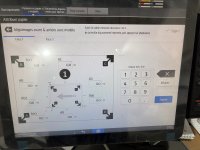
Can someone tel me how to print this pattern ? I can't find it in machine setting.
Thanks,
 

Attachments

  • IMG_BE88BD67-9737-484C-B0CE-A90B4ACF16E0.JPEG
    IMG_BE88BD67-9737-484C-B0CE-A90B4ACF16E0.JPEG
    3.6 MB · Views: 77
   
Back
Top