Somebody else HAS to have this problem....

kaiserwilhelm

Well-known member
Perfecting Jet press. File comes in right reading so we make the back page wrong reading. (Because the plate will need this).
Is there ANY utility out there that can flip a page of a pdf horizontally?
I own Pitstop and Acrobat Prof 9. I have looked, and looked, and looked.
Preview from OS X has a line for doing it, but it is always grayed out.
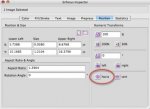
 
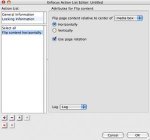
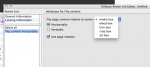
You can do it with either Pitstop inspector (7.52) by selecting all and then click the horiz button or you can setup an Action to do it. See attached images.
 

Attachments

  • Picture 1.jpg
    Picture 1.jpg
    15.8 KB · Views: 217
  • Picture 2.jpg
    Picture 2.jpg
    9.2 KB · Views: 196
What Joe said. The application commands are generally programed to operate on the selected text or object. So these commands are grayed out when nothing is selected.

Al
 
I believe that will flip the selected objects with the reflection axis going through the center of the selection. Since you probably want to flip on page center, you might want to first add a rectangle outside the page edge that is equidistant from the left and right page edges. Or note the left-edge X coordinate before flipping and make sure the right-edge X coordinate equals (page width) - (original left-edge X coordinate) after flipping. I wouldn't be surprised if there is a Pitstop action that can reflect everything from the page center, but I can't check right now.
 
Fully agreed. We already setup that rectangle at the zero zero coordinate with it being full size to the sides. The only time this has burned us in the past two days is when some strange piece goes beyond what it looks like it should go. IE, Indesign it is within the x, y, but in reality it was built in Illustrator and is giant.
 
I believe that will flip the selected objects with the reflection axis going through the center of the selection. Since you probably want to flip on page center, you might want to first add a rectangle outside the page edge that is equidistant from the left and right page edges. Or note the left-edge X coordinate before flipping and make sure the right-edge X coordinate equals (page width) - (original left-edge X coordinate) after flipping. I wouldn't be surprised if there is a Pitstop action that can reflect everything from the page center, but I can't check right now.

Which is why I included the image from the Action list. (attached here again)
 

Attachments

  • Screen shot 2009-12-31 at 2.26.37 PM.png
    Screen shot 2009-12-31 at 2.26.37 PM.png
    40.1 KB · Views: 233
Joe,

Mea culpa. I guess I read through your post about as carefully as Congress reads the bills they pass.
 
   
Back
Top