Transparency RIP Issue

metromike

Active member
We have been using XMF for 5 years and it's been pretty solid.
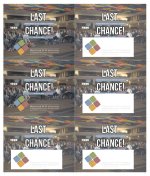
But this week we had a page that was multi up of the same thing and pages ripped differently.
I have never seen this on any RIP in my career.
I'm told that Fuji has a case with Adobe.
Anyone know anything about this issue?

Unknown.png
 
Great question but it was customer supplied out of InDesign.
I thought I would ask because I had a similar issue several months ago with a PDF file created by Canva. Although the project was digitally printed using a Heidelberg rip, I thought I would try rendering it with my Apogee system and this is what I got. As you can see, it rendered two out of the 6 positions correctly. Just to be clear, this was a single PDF containing a 6-up imposition of the same art.

To get the file to render correctly, I had to flatten it.
 

Attachments

  • Screenshot 2024-08-21 at 4.59.10 PM.jpg
    Screenshot 2024-08-21 at 4.59.10 PM.jpg
    990.2 KB · Views: 325
Last edited:
I should have been more clear with my original post.
My real question is:
Is anyone aware of a known issue? As I mentioned I was told that Fuji has a case open with Adobe about this.

I did flatten the file and it ripped fine. Later I tried ripping with trapping off at Fuji's recommendation which also worked fine.
 
Interesting. When I first rendered the aforementioned Canva file, I was on Apogee v12. Now, I am on v13.5 and the Canva file renders all 6 positions correctly.
 
This is still a problem with XMF. I was told by Fuji they still have a ticket in with Adobe but it deals with trapping through XMF. So you can turn trapping off...or tiff the problem areas and reload a pdf in.
 
   
Back
Top