

You are using an out of date browser. It may not display this or other websites correctly.
You should upgrade or use an alternative browser.
You should upgrade or use an alternative browser.
Identifying layered TIFs in InDesign
- Thread starter Gregg
- Start date
mnorman2007
Member
I always recommend flattened PSD files whether they save as Tiff or not, otherwise font issues plus others.
Stephen Marsh
Well-known member
Why do you need to identify them? Apart from file size, outside of Photoshop I thought they were flat.
Stephen Marsh
Stephen Marsh
Last edited:

Gregg
Well-known member
I'm not a fan of layered TIFs, I still prefer the traditional method of it has layers it's a PSD, if it's flat it's a TIF. We get native files sent back to us from our Repro Houses in Asia. Any color correction and/or retouching that they do is expected to be saved as a PSD. Occasionally, they slip up, which is why I would like to be able to figure out a way to identify any layered TIFs. I can look at file size and take a guess at which TIFs might contain layers, but I would like something more exact than that method.
I guess it doesn't have to be within InDesign. To be more clear, I am looking for a way to determine if a TIF contains layers - without having to open the file.
I guess it doesn't have to be within InDesign. To be more clear, I am looking for a way to determine if a TIF contains layers - without having to open the file.
Last edited:
The only way to reliably detect layers is to actually open the files in Photoshop. One can write some scripts to do that almost automatically (eg. renaming the suspect files) on a Mac, or you can automatize the whole workflow by using Enfocus Switch, driving Photoshop. This latter option gives you a plethora of possibilities, offering any kind of wizardry you can imagine.
Stephen Marsh
Well-known member
Sadly Bridge does not show any noticeable difference that I could find. So you may have to look further afield. Using ExifTool is probably going to be the best bet and there are versions for different OS:
http://www.sno.phy.queensu.ca/~phil/exiftool/
http://superuser.com/questions/91867...yers-and-or-tr
There is also a scripted Photoshop method linked above, however that would likely be slower and I am not sure if it works with TIFF files or only PSD.
Another command line tool is ImageMagick:
http://www.imagemagick.org/discourse...ic.php?t=28045
P.S. Is there an explicit layer name that may be present that Adobe Bridge could pick up on using it’s find command (all metadata)?
Please let the forum know what works for you and how you got there.
Stephen Marsh
http://www.sno.phy.queensu.ca/~phil/exiftool/
http://superuser.com/questions/91867...yers-and-or-tr
There is also a scripted Photoshop method linked above, however that would likely be slower and I am not sure if it works with TIFF files or only PSD.
Another command line tool is ImageMagick:
http://www.imagemagick.org/discourse...ic.php?t=28045
P.S. Is there an explicit layer name that may be present that Adobe Bridge could pick up on using it’s find command (all metadata)?
Please let the forum know what works for you and how you got there.
Stephen Marsh
Last edited:
Stephen Marsh
Well-known member
After exhaustive testing (i.e. not exhaustive), I worked out how to do this using Adobe Bridge using a generic keyword (layer/Layer/LAYER) using find all metadata.
EDIT: This only appears to work for text layers, not pixel or adjustment layers. Sigh… Still trying to find the XMP metadata that is different between a flat and layered TIFF.
Stephen Marsh
EDIT: This only appears to work for text layers, not pixel or adjustment layers. Sigh… Still trying to find the XMP metadata that is different between a flat and layered TIFF.
Stephen Marsh
Last edited:
Stephen Marsh
Well-known member
Tested in CS6. A study group of >1 is preferred to verify findings.This is not a definitive finding, it was just the first thing I found that worked! :]
Gregg, can you please test and confirm if the following works for you? I would also appreciate it if others could test and confirm if the following isolates layered from non layered TIFF files in Adobe Bridge.
It appears that a FLAT TIFF contains the following XMP metadata that is not present in layered TIFF files. The content highlighted in bold red would appear to be useful for a keyword search using Adobe Bridge’s Find command (All Metadata):
<stEvt:instanceID>xmp.iid:F87F1174072068118083984FF3A5DF29</stEvt:instanceID>
and
<stEvt:softwareAgent>Adobe Photoshop Camera Raw 9.1</stEvt:softwareAgent>
Before and After screenshots excluding the keyword “Adobe Photoshop Camera Raw”:
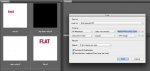
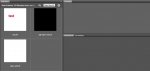
EDIT: With further testing I found a number of false positives returned when searching for TIFF files that were created outside of Photoshop and or had XMP metadata removed. So this is not a foolproof method of finding layered TIFF files as it relies on Photoshop XMP data being present. However it may just work for Gregg in the context of this particular workflow.
EDIT 2: It appears that this also returns false positives with CS2 flat TIFFs, so again if the metadata does not contain the appropriate keyword the filtering fails.
Stephen Marsh
Gregg, can you please test and confirm if the following works for you? I would also appreciate it if others could test and confirm if the following isolates layered from non layered TIFF files in Adobe Bridge.
It appears that a FLAT TIFF contains the following XMP metadata that is not present in layered TIFF files. The content highlighted in bold red would appear to be useful for a keyword search using Adobe Bridge’s Find command (All Metadata):
<stEvt:instanceID>xmp.iid:F87F1174072068118083984FF3A5DF29</stEvt:instanceID>
and
<stEvt:softwareAgent>Adobe Photoshop Camera Raw 9.1</stEvt:softwareAgent>
Before and After screenshots excluding the keyword “Adobe Photoshop Camera Raw”:
EDIT: With further testing I found a number of false positives returned when searching for TIFF files that were created outside of Photoshop and or had XMP metadata removed. So this is not a foolproof method of finding layered TIFF files as it relies on Photoshop XMP data being present. However it may just work for Gregg in the context of this particular workflow.
EDIT 2: It appears that this also returns false positives with CS2 flat TIFFs, so again if the metadata does not contain the appropriate keyword the filtering fails.
Stephen Marsh
Last edited:

David Milisock
Well-known member
Wondering if anyone can suggest a way to identify layered TIFs placed in an InDesign doc. It is nothing that Preflight will flag. Quite certain Flightcheck won't either.
I'm hoping this doesn't turn into a "what's better: PSD or TIF" conversation.
I​'m wondering if what may be better than identifying the layered tif files may be simply running a script that finds all tif files and automatically flattens them. I'm not a Photoshop guy but I'm pretty sure it can be done. In Corel we would simply run what's called a macro. I'm assuming that ID would still find them and link them as long as the name was not changed.
Stephen Marsh
Well-known member
I​'m wondering if what may be better than identifying the layered tif files may be simply running a script that finds all tif files and automatically flattens them. I'm not a Photoshop guy but I'm pretty sure it can be done. In Corel we would simply run what's called a macro. I'm assuming that ID would still find them and link them as long as the name was not changed.
I don’t believe that this would be the way to go David, the idea is to preserve the layers and save them as a PSD, then use the flattened TIF for layout.
Yes, actions (macros) are possible, however one would need a conditional action to fork out the decision, if the file is flat close (why waste time resaving a file that does not need to be resaved) – if the file is layered save as PSD, then flatten and resave as TIF. Photoshop CC> has basic conditional actions, however I am on CS6 (no conditional actions) and don’t know if the logic is available in conditional actions in later versions.
There is probably a better chance of doing the above using a script (not an action/macro), however I don’t know what is possible there.
Stephen Marsh
Last edited:
Stephen Marsh
Well-known member
Russell Brown’s “Dr Brown’s Services 2.3.1” Image Processor Pro script for Bridge/Photoshop can be configured to create a layered PSD and a flat TIFF from the input files, which could be an option, however it is not as clean as it could be for this workflow (if the TIF did not have layers, the PSD would be flat, if the TIF exists in the output directory it is not overwritten and the filename has a sequential suffix added).
Stephen Marsh
Stephen Marsh
This won't flatten any TIFFs, but it should quickly separate the flat ones from the layered ones.
If you're using a Mac, copy and paste the following into a blank TextEdit document that is "plain text" not "rich text" (changeable in the Format menu). Save it with a filename ending in ".command" so Finder will execute it with Terminal.app. You'll probably have to do a "chmod +x" on the file in Terminal to make it executable, unless you save it to a mounted network volume and move it back to your computer (that often causes the executable permission to be set).
Place the file in a directory containing TIFF files to be checked, then double-click or CMD-down to run it. It should scan each file in that directory (but not subdirectories - that behavior can be changed if desired).
If a file is a TIFF file containing Photoshop's layer tag, it will move it into a subdirectory named "MULTIPLE LAYERS," which it will create. It will scan all regular files, which should happen fairly quickly, but you can speed it up a bit by setting TIFFEXTENSIONONLY=1, which will only scan files ending in .tif or .tiff (case insensitive). The only TIFF files it should not move are ones that Photoshop will show as having a single "BACKGROUND" layer.
If there is a single non-background layer that happens to be completely opaque, which is effectively flat, it should still move it. If you consider that a false positive, you'd have to open the file and "flatten" it to make it behave as intended.
here it is:
#!/bin/bash
TIFFEXTENSIONONLY=0
cd "$(dirname "${BASH_SOURCE[0]}")"
SAVEIFS=$IFS
IFS=$(/bin/echo -n $'\n\b')
if [[ TIFFEXTENSIONONLY -eq 0 ]]; then
for N in $(find . -maxdepth 1 -type f ! -name '._*'); do
if [[ $(head -c 2 "$N") == II ]] || [[ $(head -c 2 "$N") == MM ]]; then
tiffutil -dump "$N" | grep '^37724 (0x935c)' > /dev/null
if [[ $? -eq 0 ]]; then
mkdir -p 'MULTIPLE LAYERS'
mv -n "$N" 'MULTIPLE LAYERS'
fi
fi
done
else
for N in $(find -E . -maxdepth 1 -iregex '.*tif(f){0,1}' ! -name '._*'); do
if [[ $(head -c 2 "$N") == II ]] || [[ $(head -c 2 "$N") == MM ]]; then
tiffutil -dump "$N" | grep '^37724 (0x935c)' > /dev/null
if [[ $? -eq 0 ]]; then
mkdir -p 'MULTIPLE LAYERS'
mv -n "$N" 'MULTIPLE LAYERS'
fi
fi
done
fi
IFS=$SAVEIFS
echo TIFF layer checking finished $(date)
If you're using a Mac, copy and paste the following into a blank TextEdit document that is "plain text" not "rich text" (changeable in the Format menu). Save it with a filename ending in ".command" so Finder will execute it with Terminal.app. You'll probably have to do a "chmod +x" on the file in Terminal to make it executable, unless you save it to a mounted network volume and move it back to your computer (that often causes the executable permission to be set).
Place the file in a directory containing TIFF files to be checked, then double-click or CMD-down to run it. It should scan each file in that directory (but not subdirectories - that behavior can be changed if desired).
If a file is a TIFF file containing Photoshop's layer tag, it will move it into a subdirectory named "MULTIPLE LAYERS," which it will create. It will scan all regular files, which should happen fairly quickly, but you can speed it up a bit by setting TIFFEXTENSIONONLY=1, which will only scan files ending in .tif or .tiff (case insensitive). The only TIFF files it should not move are ones that Photoshop will show as having a single "BACKGROUND" layer.
If there is a single non-background layer that happens to be completely opaque, which is effectively flat, it should still move it. If you consider that a false positive, you'd have to open the file and "flatten" it to make it behave as intended.
here it is:
#!/bin/bash
TIFFEXTENSIONONLY=0
cd "$(dirname "${BASH_SOURCE[0]}")"
SAVEIFS=$IFS
IFS=$(/bin/echo -n $'\n\b')
if [[ TIFFEXTENSIONONLY -eq 0 ]]; then
for N in $(find . -maxdepth 1 -type f ! -name '._*'); do
if [[ $(head -c 2 "$N") == II ]] || [[ $(head -c 2 "$N") == MM ]]; then
tiffutil -dump "$N" | grep '^37724 (0x935c)' > /dev/null
if [[ $? -eq 0 ]]; then
mkdir -p 'MULTIPLE LAYERS'
mv -n "$N" 'MULTIPLE LAYERS'
fi
fi
done
else
for N in $(find -E . -maxdepth 1 -iregex '.*tif(f){0,1}' ! -name '._*'); do
if [[ $(head -c 2 "$N") == II ]] || [[ $(head -c 2 "$N") == MM ]]; then
tiffutil -dump "$N" | grep '^37724 (0x935c)' > /dev/null
if [[ $? -eq 0 ]]; then
mkdir -p 'MULTIPLE LAYERS'
mv -n "$N" 'MULTIPLE LAYERS'
fi
fi
done
fi
IFS=$SAVEIFS
echo TIFF layer checking finished $(date)
Last edited:
Stephen Marsh
Well-known member
Kyle, that shell script is a thing of beauty, way to go!
Just curious – is this leveraging a core Mac OS X feature, could AppleScript also do the same? Would this work in another Unix OS or under Cygwin in Windows?
Stephen Marsh
Just curious – is this leveraging a core Mac OS X feature, could AppleScript also do the same? Would this work in another Unix OS or under Cygwin in Windows?
Stephen Marsh
This won't flatten any TIFFs, but it should quickly separate the flat ones from the layered ones.
If you're using a Mac, copy and paste the following into a blank TextEdit document that is "plain text" not "rich text" (changeable in the Format menu). Save it with a filename ending in ".command" so Finder will execute it with Terminal.app. You'll probably have to do a "chmod +x" on the file in Terminal to make it executable, unless you save it to a mounted network volume and move it back to your computer (that often causes the executable permission to be set).
Place the file in a directory containing TIFF files to be checked, then double-click or CMD-down to run it. It should scan each file in that directory (but not subdirectories - that behavior can be changed if desired).
If a file is a TIFF file containing Photoshop's layer tag, it will move it into a subdirectory named "MULTIPLE LAYERS," which it will create. It will scan all regular files, which should happen fairly quickly, but you can speed it up a bit by setting TIFFEXTENSIONONLY=1, which will only scan files ending in .tiff or .tiff (case insensitive). The only TIFF files it should not move are ones that Photoshop will show as having a single "BACKGROUND" layer.
If there is a single non-background layer that happens to be completely opaque, which is effectively flat, it should still move it. If you consider that a false positive, you'd have to open the file and "flatten" it to make it behave as intended.
here it is:
#!/bin/bash
TIFFEXTENSIONONLY=0
cd "$(dirname "${BASH_SOURCE[0]}")"
SAVEIFS=$IFS
IFS=$(/bin/echo -n $'\n\b')
if [[ TIFFEXTENSIONONLY -eq 0 ]]; then
for N in $(find . -maxdepth 1 -type f ! -name '._*'); do
if [[ $(head -c 2 "$N") == II ]] || [[ $(head -c 2 "$N") == MM ]]; then
tiffutil -dump "$N" | grep '^37724 (0x935c)' > /dev/null
if [[ $? -eq 0 ]]; then
mkdir -p 'MULTIPLE LAYERS'
mv -n "$N" 'MULTIPLE LAYERS'
fi
fi
done
else
for N in $(find -E . -maxdepth 1 -iregex '.*tif(f){0,1}' ! -name '._*'); do
if [[ $(head -c 2 "$N") == II ]] || [[ $(head -c 2 "$N") == MM ]]; then
tiffutil -dump "$N" | grep '^37724 (0x935c)' > /dev/null
if [[ $? -eq 0 ]]; then
mkdir -p 'MULTIPLE LAYERS'
mv -n "$N" 'MULTIPLE LAYERS'
fi
fi
done
fi
IFS=$SAVEIFS
echo TIFF layer checking finished $(date)
Kyle, that shell script is a thing of beauty, way to go!
Just curious – is this leveraging a core Mac OS X feature, could AppleScript also do the same? Would this work in another Unix OS or under Cygwin in Windows?
Stephen Marsh
Thanks! If I had to do this with Applescript, I'd probably just wrap most of the bash version with "do shell script." I wouldn't be surprised if some of what bash and the utility commands it invokes are doing could be done directly with Applescript, though. I hate Applescript, but at the same time, it's one of the reasons I love Macs - since there is nothing equally integrated in Windows to convert clicky-clicky inside a captive user interface into rapid-fire automation.
Most linux distributions could run almost the same script with a couple of tweaks. The find command for trying only .tif/.tiff extensions would need a small change. The tiffutil command is probably not present on most default installations but could probably be easily installed. If you're interested in a linux version that makes use of Imagemagick's "identify" command in place of "tiffutil," I could probably convert this without too much trouble.
Not too sure about Cygwin since I've only used it briefly a few years ago.

Stephen Marsh
Well-known member
Thanks! If I had to do this with Applescript, I'd probably just wrap most of the bash version with "do shell script."
Thanks Kyle, I understand, why re-invent the shell script with AppleScript code when AppleScript code will accept the shell script!
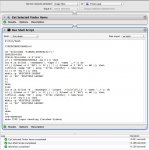
I tried setting up the shell script inside Apple Automator as a service, so that one could select the files or folder and right click/services to access the shell script anywhere in the finder.
Still trying to figure out why it will not run as a contextual service (or application)…
Stephen Marsh
Stephen Marsh
Well-known member
David Milisock
Well-known member
Cool you guys got this figured out. BTW why oh why were layered TIF files invented?
Similar threads

- Replies
- 10
- Views
- 907










