


CMYK Colour Confusion - Adobe Output Preview

Ynot_UK

Well-known member
Can anyone explain what I'm doing wrong here? - by no means a colour expert and would love to learn more if time permitted, but I think I understand the basics...
Using InDesign, I have placed a client's logo which is C3,M71,Y100,K0
I then created a rectangle, created a colour to the above spec and filled the rectangle
In output preview, the logo shows correct as C3,M71,Y100,K0 however the rectangle shows as C5,M74,Y100,K0
I'm aware by changing the simulation profile the values change, however don't believe this is relevant here as the key point being highlighted is the shades of orange are slightly different between the logo and the filled rectangle, as the values are slightly different.
Any thoughts appreciated...
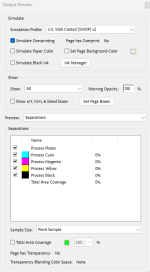
 

Attachments

  • Screenshot 2025-04-10 102038.png
    Screenshot 2025-04-10 102038.png
    29.8 KB · Views: 287
I'm no colour expert either so this is the blind leading the blind until someone with sight arrives.

Is the clients logo originally CYMK, not RGB. When this happens to me I end up running the preflight and then taking the converted colours as an easy work around.
 
I'm no colour expert either so this is the blind leading the blind until someone with sight arrives.

Is the clients logo originally CYMK, not RGB. When this happens to me I end up running the preflight and then taking the converted colours as an easy work around.
Thanks but no, the client's logo is definitely CMYK ...
 
turn off Adobe Color Correction... its garbage in my experience (outside of printing photos on an 8-ink photo printer). Microsoft ICM outputs exactly what is input

1744296847983.png
 
turn off Adobe Color Correction... its garbage in my experience (outside of printing photos on an 8-ink photo printer). Microsoft ICM outputs exactly what is input

View attachment 293938

With all due respect, Adobe Color Correction is not “garbage.” It is the basis for color management in millions of RIPs and DFEs using the Adobe PDF Print Engine (APPE) and the Adobe Embedded Print Engine (AEPE) as well as the basis for InDesign, Illustrator, and Photoshop as well as Acrobat. When you exclaim that “Microsoft ICM outputs exactly what is input” you are not referring to printing to any PostScript or native PDF printers. Microsoft ICM is implicitly used for printing to non-PostScript or native PDF printers when the output is mangled through Microsoft GDI or XPS.

In terms of the problem posed by the original poster, without seeing the original content and the resultant PDF file, it is not at all clear what is really going on. Changing the “simulation profile” is really not key to this. The logo and the rectangle may indeed have different values in the PDF file. How the InDesign document was exported to PDF and what ICC CMYK profiles may have been involved are probably the solution to this issue.
 
With all due respect, Adobe Color Correction is not “garbage.”
Adobe made changes to Acrobat Pro some time early in the DC lifespan. Which causes color shifts in output, specifically output of vector artwork not matching input vector artwork. The ONLY solution we have found to date is to turn off Adobe ICM. Specifically when printing to a Postscript Printer using a Postscript Printer Driver.
 
Adobe made changes to Acrobat Pro some time early in the DC lifespan. Which causes color shifts in output, specifically output of vector artwork not matching input vector artwork. The ONLY solution we have found to date is to turn off Adobe ICM. Specifically when printing to a Postscript Printer using a Postscript Printer Driver.

No such changes were made to Acrobat Pro (or any Acrobat product) “some time early in the DC lifespan.” I was there in the Acrobat engineering organization at that time and was involved with any such decisions that would have affected color and printing.

In terms of what was posted by Ynot_UK, seeing a difference between supposedly identical colors in a placed CMYK logo and a native CMYK vector object would have been if there was some ICC profile tagging of the placed logo that differed from the CMYK of the artwork in which it was being placed into and in which the box was drawn. (What application were you using?) Also be aware that if the logo was raster as opposed to vector, by definition there could be very minor differences in what you think a color is. Raster color values are 0 to 255; vector and text are 0.0 to 1.0. Roundoff errors can occur.

The only general color shifts that I could account for would be if you used a non-standard PostScript driver, i.e., one not based on the PSCRIPT5.DLL driver. Those non-standard drivers don't support the PostScript Passthrough feature used by all Adobe graphic arts applications (including Acrobat) when printing to PostScript devices. Those drivers require Acrobat to convert PDF to RGB-based EMF which the driver might convert to XPS which is subsequently converted by such drivers to RGB-based PostScript.

In particular, in printing to my PostScript printers, I use the following Advanced Print Setup options when printing to PostScript printers using the PSCRIPT5.DLL driver:

1744323860984.png


My overall Acrobat Color Management Preferences are set as follows:

1744324069510.png


If anyone has a problematic sample that defies the above, please privately communicate to me and I can see what's going on!
 
In terms of the original posting by YNot_UK, another factor that could be playing into noted anomalies could be transparency, either explicit or implicit, in the artwork and subsequently in the resultant PDF file. Objects that are in a transparency group could get involved in unexpected CMYK=>RGB=>C'M'Y'K' conversions which would obviously yield unexpected results.

Again, without the digital assets (including the original artwork and the resultant PDF files), it is really impossible to fully analyze what's going on.
 
In terms of the original posting by YNot_UK, another factor that could be playing into noted anomalies could be transparency, either explicit or implicit, in the artwork and subsequently in the resultant PDF file. Objects that are in a transparency group could get involved in unexpected CMYK=>RGB=>C'M'Y'K' conversions which would obviously yield unexpected results.

Again, without the digital assets (including the original artwork and the resultant PDF files), it is really impossible to fully analyze what's going on.
I had this happen just last week on a customer supplied pdf, it was driving me bonkers until I found it.
 
Can anyone explain what I'm doing wrong here? - by no means a colour expert and would love to learn more if time permitted, but I think I understand the basics...
Using InDesign, I have placed a client's logo which is C3,M71,Y100,K0
I then created a rectangle, created a colour to the above spec and filled the rectangle
In output preview, the logo shows correct as C3,M71,Y100,K0 however the rectangle shows as C5,M74,Y100,K0
I'm aware by changing the simulation profile the values change, however don't believe this is relevant here as the key point being highlighted is the shades of orange are slightly different between the logo and the filled rectangle, as the values are slightly different.
Any thoughts appreciated...
Could you please share a link to the PDF and the InDesign package?
Having access to the files would make it much easier to identify the issue. Without them, any troubleshooting would be purely speculative.
 
And for the “home audience” please tell us exactly what you found? :)
This was a simple 4/4 business card provided cmyk that I shouldn’t have had an issue because I had run at least 12 sets previously for the same customer (customer provided pdf). Same layout just different name and contact.

Problem: black background created on both sides as K89. When printed back side K was lighter than front. Not thinking that it could be the file, I saved imposed file and imported into CWS instead of printing from Acrobat hoping that would solve the issue, no luck. In the past I have had on occasion a file that did something like this, and the issue was resolved by printing as an image from Acrobat, no luck with that either.

Opened previously printed business card file from the same customer with the same K89 on front and back and it printed fine. Used Pitstop to send black background to back of layers and found a transparency that was behind the black background. Deleted transparency, saved file and it printed fine, front and back K matched.

Did someone new at the company create the file or were there any updates to software on their end? I don't know. I know now to look for transparencies as a possible culprit.
 
   
Back
Top









