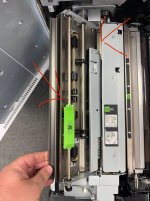
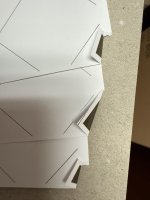
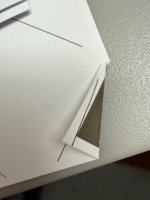
Corner of paper folding on Versant 280

NorwoodPress

Well-known member
Recently whether doing jobs single or double sided every now and again I kept getting the corner of the paper folded over. Also lately all of a sudden I can’t get through Reacto blue NCR paper keeps jamming. It’s like as though something is catching inside, but I can’t see what???

 

Attachments

  • IMG_6465.jpeg
    IMG_6465.jpeg
    921.8 KB · Views: 211
  • IMG_6466.jpeg
    IMG_6466.jpeg
    1 MB · Views: 214
  • IMG_6467.jpeg
    IMG_6467.jpeg
    960 KB · Views: 194
we had very similar issues with our Versant 4100.

First, NCR is weird on the Versant. For us, we had to disable "Multi feed detection" in the stock's profile. Something about the method in which Xerox/Fuji detects multi-feeds gets a false trigger on our NCR.

The dog-earing is a hard one. it was happening to us between the High-cap stacker input and the side Finisher-stacker. It was high pronounced on curled stocks. For us it was a combination of monitoring the decurler and manually adjusting as needed, as "Auto" really never decurls enough. Also, we have to be sure to keep sensors and the pathway mostly clean of paper dust, the worst culprit being the input sensor to the side finisher.

the input sensor reads a reflection off the feed roller shaft (underneath)
1749484562656.png


From underneath, the shaft needs to be paper dust free under the sensor window
1749484635749.png


I hope this helps your situations
 
If you're able to, try running your NCR short edge. We have Primelink's which use almost all the same peripherals as the Versant, and it basically totally eliminated jams on NCR.
 
Hmm...some other ideas:
  1. You may have a small piece of paper from a previous jam stuck somewhere that it's catching on (this can sometimes be cleared by running several really thick sheets of media to hopefully push it out of the way.
  2. There's a misalignment of machine components somewhere along the path. We had alot of issues right after one of our machines was installed because the original tech did not perfectly level each component to the next. It's possible your components have come out of alignment from settling over time, or someone slamming into it/slamming a paper drawer hard.
  3. You have a roller/belt that went bad along the path

It's a tough one to diagnose since the machine doesn't usually give an error code to help the tech locate the origin. Usually, our tech will use a flashlight and watch down the gap between each component to see where along the path the paper is catching.
 
Run a few sheets of 13x19 cover media to "floss" the paper path in case there are little pieces of paper stuck someplace causing the dogears.
 
Well still can’t find what’s causing it. It’s still hit and miss some sheets have and some don’t 😔 It does it when duplexing. Engineer has taken the machine apart with all the sections. The only part we are awaiting to replace is the registration roller. It’s definitely happening somewhere between the 2nd btr, fuser, decurler rollers…
 

Attachments

  • IMG_6493.jpeg
    IMG_6493.jpeg
    1.3 MB · Views: 193
  • IMG_6492.jpeg
    IMG_6492.jpeg
    984.6 KB · Views: 188
Well still can’t find what’s causing it. It’s still hit and miss some sheets have and some don’t 😔 It does it when duplexing. Engineer has taken the machine apart with all the sections. The only part we are awaiting to replace is the registration roller. It’s definitely happening somewhere between the 2nd btr, fuser, decurler rollers…
Please let us know what the problem was when it gets figured out.
 
Please let us know what the problem was when it gets figured out.
Well the engineer came back today with the registration roller and changed it over. However now the paper keeps jamming before it gets to the 2nd BTR. So engineer has now escalated it higher up to manager and awaiting for someone else to come out.
 
   
Back
Top