Looking for a Paper Jam Removal Tool

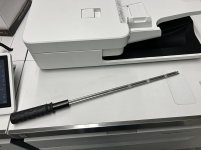
We have this tool for removing paper jams from our printers and it's fantastic. I really want to gift one to a friend who works at my old shop, but I can't find them anywhere. I even asked our Xerox techs if it was one of their tools and they said it wasn't theirs. Does anyone know where to buy this tool?
 

Attachments

  • PaperJamRemover.JPEG
    PaperJamRemover.JPEG
    1.6 MB · Views: 497
That is a very unique tool and I can see how that would come in handy. I tried a few different google searches and even reverse image search without luck. Someone on reddit had the same request but received no help. In our shop we have a pair of really long skinny tongs/tweezers similar to these that help to grab difficult-to-reach jams or tiny pieces of paper that have been ripped off. Seems like they would work similarly to your tool.
 
never seen such a thing? I think I get how... but, how DOES it work??
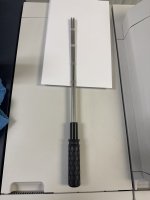
You feed it into the printer such that the jammed paper is in between the two prongs, then you spin it like a fork with spaghetti and the paper rolls around it so you can remove it without tearing it and leaving pieces in the printer.
 
So funny. We have one of those at my shop. It was here already when I was hired. We had a Versant 180, when the Canon guys came to install our V900 ImagePress one of the techs took pictures of it and asked where we got it. It is a great tool!
 

Attachments

  • tool.JPG
    tool.JPG
    233.2 KB · Views: 300
Xerox tool?
  1. Refer to the jam clearance message on the press interface for the area of the press affected by the jam.
  2. To access the jam areas of the press, open the module doors.
  3. Open all the paper path levers by lifting the green transport handles.
  4. Retrieve the Jam Clearance Tool.
  5. Locate the paper in the module and use the jam clearance tool:
    1. Insert the two fork tines of the tool onto the sheet and rotate the tool so that the sheet wraps around the tines.
    2. Keep turning the tool until the sheet is completely wrapped around the tines.
    3. Pull the tool straight out of the press along with the sheet attached.
    4. Remove the sheet from the tool and discard the sheet.
  6. If needed, cancel the job and restart.
 
Xerox tool?
  1. Refer to the jam clearance message on the press interface for the area of the press affected by the jam.
  2. To access the jam areas of the press, open the module doors.
  3. Open all the paper path levers by lifting the green transport handles.
  4. Retrieve the Jam Clearance Tool.
  5. Locate the paper in the module and use the jam clearance tool:
    1. Insert the two fork tines of the tool onto the sheet and rotate the tool so that the sheet wraps around the tines.
    2. Keep turning the tool until the sheet is completely wrapped around the tines.
    3. Pull the tool straight out of the press along with the sheet attached.
    4. Remove the sheet from the tool and discard the sheet.
  6. If needed, cancel the job and restart.
Yes, @namelessentity identified it as Xerox part # 655N00569 JAM CLEAR ASIST
 
   
Back
Top