phebbinckuys
Member
I want to select all 100% black elements (text, lines, ...) and make sure they knockout (do not overprint!) on other elements.
I made an action list that selects all elements that are:
• DeviceGray with 0% brightness
• DeviceCMYK with 100%K
and set the overprint to knock out.
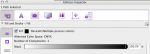
So far so good, it works fine, but I found some elements that are DeviceN with one component:'Black' that are not selected, so they don't change.
(I attached an Inspector screen-shot of such an element when selected)
Is there any way to include those elements in the selection?
I made an action list that selects all elements that are:
• DeviceGray with 0% brightness
• DeviceCMYK with 100%K
and set the overprint to knock out.
So far so good, it works fine, but I found some elements that are DeviceN with one component:'Black' that are not selected, so they don't change.
(I attached an Inspector screen-shot of such an element when selected)
Is there any way to include those elements in the selection?