


jwheeler
Well-known member
We have a Postmark RapidColor 1170 Pro inkjet envelope printer. This is the same rebranded engine as the iJet 1175C
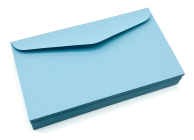
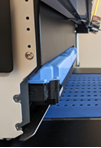
We're trying to run some #10 Domtar blue envelopes (a light/pastel blue) and they keep coming out blank. We switch to white envelopes and they print just fine. I'm assuming this means the laser eye that senses the envelopes entering under the print head can't see it against the blue transfer belt. The blue of the paper is much lighter than the transfer belt as you can see with the images below. Does anyone know if there is a setting we can turn on/off that would enable this to work?
We're trying to run some #10 Domtar blue envelopes (a light/pastel blue) and they keep coming out blank. We switch to white envelopes and they print just fine. I'm assuming this means the laser eye that senses the envelopes entering under the print head can't see it against the blue transfer belt. The blue of the paper is much lighter than the transfer belt as you can see with the images below. Does anyone know if there is a setting we can turn on/off that would enable this to work?








