InDesign Halftone Values...

kdw75

Well-known member
We have an Harlequin RIPs driving our film imagesetters. We calibrate them regularly by having the RIP run out test strips that we scan.

Everything we run out of QuarkXPress looks good and when we run a 50% screen we get a 50% screen on the press, since we allow for dot gain. The problem is that when we run a 50% screen out of InDesign we get a screen on the press that is around 45%. As you can imagine this causes the colors to look less vibrant and isn't desirable. Both Quark and InDesign use CMYK SWOP profiles.

Any thoughts on what to look for?
 
[SNIP]
Everything we run out of QuarkXPress looks good and when we run a 50% screen we get a 50% screen on the press, since we allow for dot gain.[SNIP]

Methinks you have to explain that statement because a 50% request in the file should not result in a measured 50% tone value in the presswork if you want to align to industry standards and specifications.

best, gordo
 
I was under the impression that the software was allowing for dot gain. The calibration we do does not take into account our computer software since it is done solely on the RIP with it's built in calibration. On the press we are getting a measured 53% screen out of Quark. I wasn't being precisely accurate on the screen values as I was mainly focusing on why Quark and InDesign would give me such differences when both are sending the same screen percentages to the Imagesetter.
 
I was under the impression that the software was allowing for dot gain. The calibration we do does not take into account our computer software since it is done solely on the RIP with it's built in calibration. On the press we are getting a measured 53% screen out of Quark. I wasn't being precisely accurate on the screen values as I was mainly focusing on why Quark and InDesign would give me such differences when both are sending the same screen percentages to the Imagesetter.

Dot gain is a normal part of the print production process. Don't think of it so much as something to compensate for but as representing a target for tone reproduction. If you specify a 50% tone in your design app then that 50% should measure 65% in the presswork.
Try doing a black only 11 step wedge in PhotoShop. It should go from 100% black to 0% in 10% increments. Import that graphic into inDesign and Quark. Make sure that the PDF export settings are identical, then export the graphic as a PDF from each app. Then open the two PDFs in Acrobat and measure the grey patch's tone values. They should be identical. That should show that you're sending the same tone values out of inDesign and Quark to your RIP.

Best, gordo
 
I will give that a shot and report back. Thank you for you help.

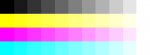
If you get the correct values then create a new CMYK image and paste the grey step wedge into each channel. You'll get an image like the attached. Then import into inDesign and Quark then export out as PDFs (with the same settings). Then measure them in Acrobat. If they still read correctly then the problem is not with Quark and inDesign.

best, gordo
 

Attachments

  • Swatches.jpg
    Swatches.jpg
    757.5 KB · Views: 300
Try the test Gordon describes, but on press. Put the Quark and Indesign images parallel within one inch of each other with the test scales aligned with the cylinder axis, so that ink fountain key settings are not a factor, on the same plate, in the same press run.

If a solution to this problem is a serious interest to your company, the costs of this test should not be a concern. Let us know the results.

Al
 
Last edited:
Try the test Gordon describes, but on press.

It's a bit early for the press. I'm trying to isolate each part of the process to find out where it breaks.
First find out if the two apps deliver the same final files to the RIP.
Then find out if the plates have the same tone values.
If the plates have the same values, then check the press condition.

Best gordo
 
Attached is a Photoshop action that I made to automate the creation of a step wedge (yes, I found that I was doing it that often!). It will create a grayscale, RGB or CMYK step wedge (11 and 21 step) and gradient. The action requires user input on the width/height/resolution and then it runs without user input. Hope this helps.


Stephen Marsh
 

Attachments

How are you getting files to the Harlequin? Do you export PDFs? Are you printing PostScript to the Harlequin? Are you printing PostScript directly to the imagesetter?
 
We are printing directly to the imagesetter. I think I found the problem. It looks like it had to do with how the files were being sent out of Quark by one user and how the other user was sending them out of InDesign. One was using a RIP profile that used in RIP separations while the Quark user was doing the separations in Quark, which meant that the RIP was treating the pre-seperated process jobs as generic colors which use a different calibration profile than process.
 
   
Back
Top