[email protected]
Member
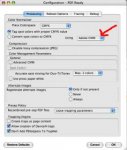
Current Apogee Prepress 5.0 user: We are seeing unsatisfactory results converting RGB files to CMYK at the RIP when compaired to converting in native applications such as photoshop.
Photoshop conversion maintains original color and brilliance while Apogee conversion is muddy and dark. Anyone having success (or experiencing same problem) converting RGB to CMYK at RIP in Apogee workflow or other workflow: Please respond.
Photoshop conversion maintains original color and brilliance while Apogee conversion is muddy and dark. Anyone having success (or experiencing same problem) converting RGB to CMYK at RIP in Apogee workflow or other workflow: Please respond.