PDF clean-up/debugging/fixing?

CathieH

Well-known member
Hey there.

Does anyone know of a good program out there that can take a PDF file, troubleshoot it and fix it once it's become corrupt? I've had a couple of good PDF files that ran fine, but once I pulled them off the server and ran them, a page or two would be come corrupt and not allow the file to run.

Thanks in advance for any suggestions.
Cathie
 
Acrobat Pro has a preflight process for fixing "corruption" and one could also try doing an Acrobat Pro save as... I am sure others will chime in with third party tools. Good luck!

Stephen Marsh
 
I guess I should've mentioned that I have Acrobat Pro X and Enfocus Pitstop. The "save as" does sometimes work and I should remember that more often.a

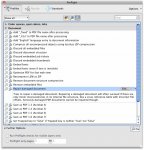
I didn't know that Acrobat Pro had a preflight process for fixing a corrupt file. I assume it's in the "printing" area?

Thanks for the input.
 
Hi CathieH,

Acrobat will work it's magic when you open the file. Sometimes you'll see a dialog box appear saying it's fixing it, other times it's so quick you might not catch it. Usually the "Save" button will be active if this occurs, otherwise it will be grayed out.

Regards,
Greg
 
I didn't know that Acrobat Pro had a preflight process for fixing a corrupt file. I assume it's in the "printing" area?

Hi Cathie, screenshot attached!

Best,

Stephen Marsh
 

Attachments

  • repair-doc.jpg
    repair-doc.jpg
    137.9 KB · Views: 239
I run into issues with this sort of thing a lot when a PDF is placed into InDesign and a new PDF is generated. I would like to get more debugging information out of Acrobat.

With the tools you've got, sometimes I can convert all text to outlines, open the PDF in Acrobat and then save out a new PDF.
 
Unfortunately, all I get are either PDF, Word or PPT documents. I don't have InDesign (big bummer there) and have to work with what my internal clients send me. So, it's a fix the PDF document situation or nothing. I'll check into the Preflight/single fixups/document/repair document that Stephen mentioned. I'll also explore Pitstop Pro and see if they have anything along those lines.
 
Oops! I said, "With the tools you've got, sometimes I can convert all text to outlines, open the PDF in Acrobat and then save out a new PDF."

What I meant to say is, "With the tools you've got, sometimes I can convert all text to outlines, open the PDF in Illustrator and then save out a new PDF."

You don't have the Creative Suite? That is a serious limitation.
 
Yes, I know that not having CS is limiting, but I really don't find that I need it that often. If I find more use for it in the future, I'm sure my company would purchase a copy for me since we have a multiple license here. But I simply can't justify it right now.
 
Hi CathieH,

I sent you a private message about a product which may be useful to you. It's a cloud-based solution that will preflight and fix files. It's currently in pilot mode (not yet released) so you can use it for free if you are enrolled in the pilot program. It's great for shops that need help processing those random problematic files. Let me know if you'd like more info.

Greg
 
   
Back
Top