jotterpinky
Well-known member
I'm trying to select some addresses on a large page count document and shift them to another position on the page to better align with envelope window.
I have an action list setup to do the following:
Select All
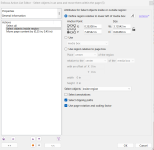
Select Objects inside region (I'm choosing the region by selecting the address on the first page and then using the eyedropper to grab the offsets)
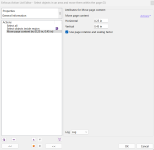
Move page content by (0.25 in Horizontal, 0.45" vertical)
If I step through this it selects the correct objects but the "Move page content" does not shift the position of anything. What am I missing here?
I have an action list setup to do the following:
Select All
Select Objects inside region (I'm choosing the region by selecting the address on the first page and then using the eyedropper to grab the offsets)
Move page content by (0.25 in Horizontal, 0.45" vertical)
If I step through this it selects the correct objects but the "Move page content" does not shift the position of anything. What am I missing here?