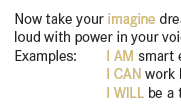
Yellow(ish) text on white background

EdwardB

Well-known member
I'm always looking for better/new ways to fix people's stupid design choices. I tinker with different things and usually come back to this nearly every time... maybe you people do something I haven't tried yet.

Typically in circumstances like light colored text on a white background, where the contrast is very low, I will stroke the outline the affected text. Using a 50% grey stroke, at either .001 or .002 inches.

today's example is a "goldish" colored text, outlined at .001
1767888987322.png
1767889053787.png


The outlining is way more noticeable on screen, but more subtle and effective on paper in increasing contrast, which in a way is what I'm trying to achieve.
 
what program are you using? if INDD, something I'd try is a character style that applies a custom underline to the words you're trying to give contrast to - similar to this: Adobe InDesign: Highlighting Text – Rocky Mountain Training

It would greatly help your contrast problem, but it would be a big change. Not sure if that's what you're looking for with this post. I'm pretty sure that without changing the color/luminance of the yellow (as you've done with that outline) - there's not a lot that can be done outside of creating fancy design elements to increase the contrast
 
I wouldn't touch it. I'd either print as is and let the customer learn from their mistake, or I'd call/email them to advise that their light yellow text won't show up very well against the white. Then let them decide how to fix it and submit a new file, or you can offer a suggestion of how you/they can fix it. If you just modify as you see fit, then they now have a reason to reject the order.
 
I wouldn't touch it. I'd either print as is and let the customer learn from their mistake, or I'd call/email them to advise that their light yellow text won't show up very well against the white.

That should be framed and put on the wall in prepress.

You never assume what the customer's intent is. For example, I once received an invoice where the yellow text and background color had very little contrast which made the text extremely difficult to read.:

Fake bill blurred small.jpg


It was done on purpose because the invoice was a scam.
 
@jwheeler
normally I would agree... these usually are staff/teacher supplied files, usually found off the internet as "free to print". Normally our in-house created documents don't have these issues, and those documents that are created by staff with these kinds of problems are kicked back to the document owner. These "Free to Print" documents come with no support and are "as-is", so we as a service, try to make a better/more usable document when printing them.
 
   
Back
Top