Lines on Versant 280

NorwoodPress

Well-known member
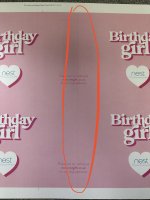
I've been printing some cards single sided, on 350gsm uncoated and I've noticed that either on the right edge or sometimes it moves in the middle more I seem to have like a sold line going down. Like as though some roller is something rubbing ?

See photos below.

Anyone know what this could be?
 

Attachments

  • IMG_2667.jpg
    IMG_2667.jpg
    886.3 KB · Views: 568
  • IMG_2668.jpg
    IMG_2668.jpg
    944.9 KB · Views: 445
  • IMG_2669.jpg
    IMG_2669.jpg
    792 KB · Views: 464
  • IMG_2670.jpg
    IMG_2670.jpg
    957.2 KB · Views: 447
  • IMG_2671.jpg
    IMG_2671.jpg
    863.1 KB · Views: 478
Its banding, big very well known flaw on the Versant range.
If cyan is the predominant colour you'll see it about 30mm from lead edge, if magenta about 100mm past this, then yellow 100mm again and then black is about 30mm from tail edge. Basically same distance and order as your drums are.

I generally only see it on heavier weights.

Workarounds i've found are -
Try running as 150dot
Switch paper type to Cast Coated
Where possible adjust the cymk mix to have a more even breakdown, mainly helps with greys as easier to do and not always possible with colours.
A real pain but on really low volume, only run one sheet at a time.
Adjust your layout, can you position the files better on sheet to avoid.

The problem has been around since the V80 which we have, they've tried uprading motors etc on the 180 and 280 but have never solved it.
Amazing really, such a critical flaw.

 
If I had that on my older Versant 2100 the first thing I would look at would be the colour drums. Could try some other laser calibrations as well but don't think those being out would do anything like that. If remember there was also a cleaning brush that you could run through the drum area?

That was certainly not a issue on the V2100 from my experience
 
This thread here is from a few years ago with the same issue.
This specific post has a workaround for CYM but not K.


You may want to check with a tech for values for 280
This is the skip pitch and I was able to use it on my 80 but not on the 280. Not sure if the tech needs to set it up to work but my tech didn't know anything about it. There is however a option in Fiery "Ink Setoff Prevention" which is also skip pitch and it's available on control panel under "other settings" but neither one puts it into skip pitch mode to slow the engine down like it should. Frustrating.
 
Its banding, big very well known flaw on the Versant range.
If cyan is the predominant colour you'll see it about 30mm from lead edge, if magenta about 100mm past this, then yellow 100mm again and then black is about 30mm from tail edge. Basically same distance and order as your drums are.

I generally only see it on heavier weights.

Workarounds i've found are -
Try running as 150dot
Switch paper type to Cast Coated
Where possible adjust the cymk mix to have a more even breakdown, mainly helps with greys as easier to do and not always possible with colours.
A real pain but on really low volume, only run one sheet at a time.
Adjust your layout, can you position the files better on sheet to avoid.

The problem has been around since the V80 which we have, they've tried uprading motors etc on the 180 and 280 but have never solved it.
Amazing really, such a critical flaw.
Thanks for these suggestions I'm going to try these. I'm trying to print a job that has a lot of photos with smooth skylines and can see banding in many of the areas. This is a new paper for us "Blazer Digital 80# Satin Cover 216gsm" I initially loaded this as Coated and was running it at 1200 dpi but it was too grainy and banded, went down to 600 dpi and also swopped out the black drum as it was affecting the quality. The prints are better than the first testing but hoping some of your suggestions will get the prints better.
 
   
Back
Top