

You are using an out of date browser. It may not display this or other websites correctly.
You should upgrade or use an alternative browser.
You should upgrade or use an alternative browser.
dot gain pattern
- Thread starter maks
- Start date
This is weird. I presume you have run the correct ink amount and you used a densitometer. The round dot is a good choice, it offers predictable and controlled dotgain on press. Your screening is low enough to ensure good reproduction on paper with 97 percent measured at 95 patch as you say which is perfect. The dotgain in midtones is also within normal range... I understand it's only the highlight range affected (??). Is it a sheetfed machine or heatset. You say you use positive thermal plates and they're linear, do you have any linearization curve applied or not.
If the platesetter is correctly set up for this media run an uncalibrated test (you should be within 1-1.5 percent off from nominal anyway) and retest on press. May be also worth testing on another printing unit and/or different grade of paper see if this changes anything.
Do you expose plates at 2400 dpi ?
If the platesetter is correctly set up for this media run an uncalibrated test (you should be within 1-1.5 percent off from nominal anyway) and retest on press. May be also worth testing on another printing unit and/or different grade of paper see if this changes anything.
Do you expose plates at 2400 dpi ?
SteveSuffRIT
Well-known member
Always "look" at the halftone dot structure under a magnifying glass for any potential issues, distortion, deformation, doubling, etc. Don't just "blindly" trust (pun intended) the measuring instrument.
i am barely new to this company and is supposed to conduct fingerprinting and profiling of the 6 sheetfed offset presses but this first press we tested show that on a linear plate, the tvi measurement comes out like this for all cmyk on a density of 1.5. do i need to check press settings?
| 100 | 95 | 90 | 85 | 80 | 75 | 70 | 65 | 60 | 55 | 50 | 45 | 40 | 35 | 30 | 25 | 20 | 15 | 10 | 5 |
1.52 | 98.80 | 96.70 | 94.20 | 91.00 | 87.90 | 84.10 | 81.00 | 77.20 | 57.90 | 68.60 | 63.40 | 57.90 | 52.50 | 46.80 | 40.70 | 34.10 | 28.60 | 21.80 | 14.30 |
SteveSuffRIT
Well-known member
It's very unusual to get the same Tone Values (TV) for each C,M,Y,K ink at the same Solid Ink Density (SID) of 1.52.
Which color was this for?
I assume the TV data you provided is for a printed press sheet, how does the linear plate TV measure?
I think you need to check a few things with measurement devices and in prepress (File, RIP, Curves, Plates) before you start checking press settings.
How are you measuring the dot size area on the plate, with what instrument?
You said the plates are "linear". Did you confirm software at Raster Image Processor (RIP) is in fact set to linear? Linear plate should be within +/-1%.
Can you provide a photo of 5% dot on imaged linear plate and on printed press sheet?
"Picture is worth a thousand words"
Which color was this for?
I assume the TV data you provided is for a printed press sheet, how does the linear plate TV measure?
I think you need to check a few things with measurement devices and in prepress (File, RIP, Curves, Plates) before you start checking press settings.
How are you measuring the dot size area on the plate, with what instrument?
You said the plates are "linear". Did you confirm software at Raster Image Processor (RIP) is in fact set to linear? Linear plate should be within +/-1%.
Can you provide a photo of 5% dot on imaged linear plate and on printed press sheet?
"Picture is worth a thousand words"

gordo
Well-known member
Adding to Steve's post - ideally you will have a microscope that can take photos like this one:
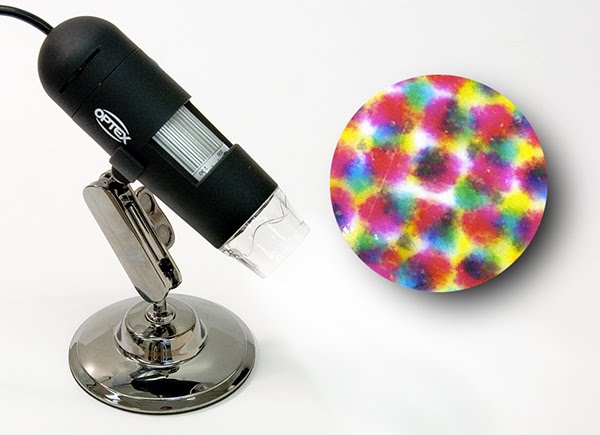
They are inexpensive - usually much less than $100 on Amazon.
You can use it to compare the appearance of the dots on the plate against the dots on the press sheet at corresponding tone values. They should appear very similar. The microscopic view of the dots on the press sheet will also tell you a great deal about the press condition. E.g. slur, doubling, over emulsification etc.
They are inexpensive - usually much less than $100 on Amazon.
You can use it to compare the appearance of the dots on the plate against the dots on the press sheet at corresponding tone values. They should appear very similar. The microscopic view of the dots on the press sheet will also tell you a great deal about the press condition. E.g. slur, doubling, over emulsification etc.
SteveSuffRIT
Well-known member
Maks,
The photo looks correct for percent size area coverage.
Round dot shape does NOT touch adjacent dots at 50% but at about ~68%.
So, double check you spectro-densitometer settings and measurement that says your 5% is measuring 14%.
I would trust the plate reader dot size area measurement more (because it's counting pixels) than the spectro-densitometer which is estimating size based on light absorption calculations, either Murray-Davies N=1 or Yule-Nelson N>1.
Also, in your photo, I assume your plate emulsion coating image color is blue and that is not cyan ink?
The photo looks correct for percent size area coverage.
Round dot shape does NOT touch adjacent dots at 50% but at about ~68%.
So, double check you spectro-densitometer settings and measurement that says your 5% is measuring 14%.
I would trust the plate reader dot size area measurement more (because it's counting pixels) than the spectro-densitometer which is estimating size based on light absorption calculations, either Murray-Davies N=1 or Yule-Nelson N>1.
Also, in your photo, I assume your plate emulsion coating image color is blue and that is not cyan ink?
SteveSuffRIT
Well-known member
There is a newer way to measure Tone Value (TV) not using densitometry with Stats-T wide band filters (Kodak Wratten #25R, 58G, 47N) but using colorimetry with CIE XYZ.
It's called CTV for Colorimetric Tone Value, also known as SCTV where SC is Spot Color.
It works on any/all colors, process (CMYK) and Spot (Pantone PMS).
Original inventors were Birkett-Spontelli (B-S) and published in 2005 at TAGA.
Now used in ISO 20654-2017.
It's called CTV for Colorimetric Tone Value, also known as SCTV where SC is Spot Color.
It works on any/all colors, process (CMYK) and Spot (Pantone PMS).
Original inventors were Birkett-Spontelli (B-S) and published in 2005 at TAGA.
Now used in ISO 20654-2017.
gordo
Well-known member
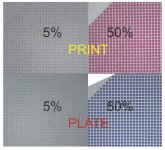
attaching print and plate using the scope. we have xrite exact 2 to read the tvi and the platereader for the plate. please comment
One of the reasons that the microscope can be a very valuable tool is that it can reveal problems that can otherwise be missed.
For example the dot doubling in the black in this plate/print comparison:
BTW did you rotate the images that you posted so that they appear to have the same screen angle?
Hello Maks. Few questions here that perhaps you can shed some light on -
1 - What are you using to validate or verify that your calibration is correct? Are you using a software program (similar to Curve4, Curve+) to validate your curves?
2 - Are you aiming for Gray (G7) or targeting TVI only?
3 - What are your target densities that you are running?
4 - Is this conventional or UV inks? Results in TVI will be radically different between one and the other.
5 - What workflow are you using to curve your plates? Running a positive plate, perhaps your curve numbers are inverted?
6- What stock are your running? 1.50 for Black on a coated stock seems a bit low. 1.50 for Uncoated stock is an overload and a lot. Normal ink film would lend to somewhere in the 1.70 - 1.80 range to target L*a*b* values for coated while uncoated should be 1.15 - 1.20.
1 - What are you using to validate or verify that your calibration is correct? Are you using a software program (similar to Curve4, Curve+) to validate your curves?
2 - Are you aiming for Gray (G7) or targeting TVI only?
3 - What are your target densities that you are running?
4 - Is this conventional or UV inks? Results in TVI will be radically different between one and the other.
5 - What workflow are you using to curve your plates? Running a positive plate, perhaps your curve numbers are inverted?
6- What stock are your running? 1.50 for Black on a coated stock seems a bit low. 1.50 for Uncoated stock is an overload and a lot. Normal ink film would lend to somewhere in the 1.70 - 1.80 range to target L*a*b* values for coated while uncoated should be 1.15 - 1.20.
Last edited:
good day! needing advise and inputs as our production performed another press inspection. again, we get same result of very high highlight but starts to normalize from midtone to shadow for all cmyk print. what are we missing in terms of executing proper makeready. our 5% mesures 12% but 50% measures 64% for almost all colors. same as my previous earlier post.
please comment and help analyze.
thanks
please comment and help analyze.
thanks
Are you measuring these numbers on a printed sheet? or are these numbers coming off a plate?good day! needing advise and inputs as our production performed another press inspection. again, we get same result of very high highlight but starts to normalize from midtone to shadow for all cmyk print. what are we missing in terms of executing proper makeready. our 5% mesures 12% but 50% measures 64% for almost all colors. same as my previous earlier post.
please comment and help analyze.
thanks
See inquiry posted above that you never responded to.

SteveSuffRIT
Well-known member
What value do you get if you measure the dot size area with a plate reader and not a densitometer?
5% on file is 5% on plate. i
2. tvi only
3. k @ 1.75, c @ 1.55, m @ 1.50 and y @ 1.30
4. conventional inks
5. proman/process calibration of heidelberg
6. actually we printed on c2s, claycoat and foldcoat; all producing same pattern - highlight is beyond the target and midtone/shadow just inside the target.
plate is linear from 1 to 99 using an ic-plate
1. we are using exactV2 to manually record the tvi based on reference is0 12647-2:2026Hello Maks. Few questions here that perhaps you can shed some light on -
1 - What are you using to validate or verify that your calibration is correct? Are you using a software program (similar to Curve4, Curve+) to validate your curves?
2 - Are you aiming for Gray (G7) or targeting TVI only?
3 - What are your target densities that you are running?
4 - Is this conventional or UV inks? Results in TVI will be radically different between one and the other.
5 - What workflow are you using to curve your plates? Running a positive plate, perhaps your curve numbers are inverted?
6- What stock are your running? 1.50 for Black on a coated stock seems a bit low. 1.50 for Uncoated stock is an overload and a lot. Normal ink film would lend to somewhere in the 1.70 - 1.80 range to target L*a*b* values for coated while uncoated should be 1.15 - 1.20.
2. tvi only
3. k @ 1.75, c @ 1.55, m @ 1.50 and y @ 1.30
4. conventional inks
5. proman/process calibration of heidelberg
6. actually we printed on c2s, claycoat and foldcoat; all producing same pattern - highlight is beyond the target and midtone/shadow just inside the target.
plate is linear from 1 to 99 using an ic-plate
First off, those coated densities are considerably higher than normal that you run. Perhaps a different filter setting?
K - 1.70 - 1.75
C - 1.35 - 1.40
M - 1.40 - 1.45
Y - 1.00 - 1.05
It’s been years since calibrating strictly to TVI. Here in the U.S., most commercial printing and or packaging printers have migrated to the G7 methodology.
I also saw that you’re running a 150 Line Screen? Have you tried 175 - 200 line?
What brand ink / series are you running? Are your inks ISO-12647-2 / ISO-2846 Compliant?
K - 1.70 - 1.75
C - 1.35 - 1.40
M - 1.40 - 1.45
Y - 1.00 - 1.05
It’s been years since calibrating strictly to TVI. Here in the U.S., most commercial printing and or packaging printers have migrated to the G7 methodology.
I also saw that you’re running a 150 Line Screen? Have you tried 175 - 200 line?
What brand ink / series are you running? Are your inks ISO-12647-2 / ISO-2846 Compliant?
Similar threads











