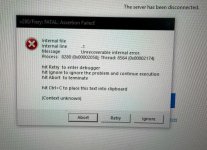
I agree with Dov. This is a contact vendor support situation (dealer or Xerox's Fiery helpdesk if they still have it).
Could be a file issue. Could be connectivity to the press issue. Could be an issue with the fiery software.
Here are a few threads to pull
1- is this a file causing the fiery software to crash?
Does this issue happen with multiple files that are dissimiliar or just one file? If one file, it might that file is poorly encoded / non-compliant.
2- Try moving the "HDMI" cables away from the back of the press, but leaving them connected. Someone I know with a V280 had an issue with the cables getting over heated causing connectivity issues.
3- gather and share crash diagnostics
Go to the Windows Event Viewer > Administrative items and share the error screenshots of around when the crash happened. Fiery software uses multiple sub applications that run as Windows Services and the Windows Events might provide clues as to what is crashing.