


Konica Minolta Envelope Printing

Robohopar

Well-known member
Hello,

My KM 12000 has a envelope fuser. Love that thing. I've ran probably 100k envelopes through it so far. Everything from small A5 all the way up to 13x10's. I've always ran them flaps closed, no issues whatsoever. Just recently the envelope flaps started wrinkling. The techs tried everything and so far no luck. They rebuilt the fuser, changed the registration unit, checked all the belts, rollers etc. Doesn't matter if its a large or small envelope, it does it on all. We did a panic stop on it and realized it wrinkles before we it reaches the fusing unit.

I know I know...manual says run them with the flap open and it runs fine like that but not feasible on larger runs and since i've ran 100k+ already with no issues, i'm assuming something has gone wrong with the paper path. I know, I should get a envelope printer with that kind of volume, I would but I really don't have room left at my shop.

Just picking anyone's brain if they've had this issue at all or have any tips, thanks!
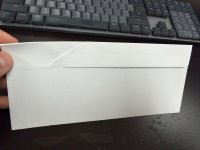
 

Attachments

  • WhatsApp Image 2025-12-04 at 11.09.11 AM.jpeg
    WhatsApp Image 2025-12-04 at 11.09.11 AM.jpeg
    622.3 KB · Views: 255
Just picking anyone's brain if they've had this issue at all or have any tips, thanks!
Have you tried stock from a different batch? Could be some small difference like different glue under that flap to what you've had before
Have you tried using the regular fuser on envelope setting?

Envelopes can be fickle - we print many C6 envelopes and notice output variations from one batch to another. In fact today we've just organised to send 11k back which come out with an extreme curl, yet the last batch came out flat
 
Have you tried stock from a different batch? Could be some small difference like different glue under that flap to what you've had before
Have you tried using the regular fuser on envelope setting?

Envelopes can be fickle - we print many C6 envelopes and notice output variations from one batch to another. In fact today we've just organised to send 11k back which come out with an extreme curl, yet the last batch came out flat
Yes, I've tried probably 6 different envelope styles/sizes. They all do the same thing.
 
I wish I knew the KM1200. Which tray(s) are you running out of? My guess is it has active registration (what doesn't anymore), its probably shifting the envelope side to side to compensate for an off-center feeding location, twisting the flap. Xeroxs/Fujis have the ability to register/calibrate the feed location to reduce the amount of shift it needs to do on stocks, it'll just automagically start to draw the image in that calibrated location.
 
I wish I knew the KM1200. Which tray(s) are you running out of? My guess is it has active registration (what doesn't anymore), its probably shifting the envelope side to side to compensate for an off-center feeding location, twisting the flap. Xeroxs/Fujis have the ability to register/calibrate the feed location to reduce the amount of shift it needs to do on stocks, it'll just automagically start to draw the image in that calibrated location.
KM only lets you run from the bottom tray, for me its "tray 3". It also lets you use tray 2 which is the middle tray IF you have the dipswitch enabled...which I do and tried from that tray also...same result. And yes, i'm suspecting the registration compensating also.

what happens if you use the regular fuser?
It happens before it reaches the fuser, but tried the regular fuser too just to make sure I check everything and its the same issue.
 
KM only lets you run from the bottom tray, for me its "tray 3". It also lets you use tray 2 which is the middle tray IF you have the dipswitch enabled...which I do and tried from that tray also...same result. And yes, i'm suspecting the registration compensating also.
can you turn off registration? on the Xerox I can just select "Alignment Profile: Tray X: Default Registration" instead of "Stock Registration: XYZ Profile". Essentially bypassing the media registration and the printer just prints without trying to make any corrections....

I'm trying to think of workarounds that might work for you
 
We have the same issue, seems to come down to the quality of the substrate used to convert the envelope.
Just ran 23k+ 6.125x9.625 booklet envelopes on a single run and depending on the box of envelopes there was a clear difference in stiffness and brightness. Many boxes would cause the flap to wrinkle just like yours do. US Office #10 seem to be the worst, we switched to cougar 60/70# #10 and have had a bit better luck.

That being said if you and/or your technician come up with a mechanical fix I would love to hear it and pass on the information to our copy tech.
 
Have you tried lying to the machine about the envelope height? For example, if it's a #10, instead of 4.13, try 4.25. You may have to do an image shift of the artwork.
 
to me, looks like a roller pressure issue, I assume envelope enter machine from right side, then the tail side got twisted, maybe a worn bearing?
 
I have this issue with my Ricoh 7200's, I can get it to get better by adjusting the NIP pressure roller on the fuser.

As explained to me, as the roller hits the envelope it pushes that flap crease along till it hits the back of the envelope and at that point it creases. I was told it was due to air under the flap.
 
Ya, unfortunately this crease happens before it even hits the roller. My KM techs are diving in to see if they can figure it out even though factory states you have to run them with the open flap.
 
We have the same issue. We've been trying to get KM service to fix it for three years now. At the end of the day, it's a false promise. They promise that you can run envelopes through the KM 12000 and the KM 14000 but it doesn't work closed flap. I originally purchased my 14000 so I could use it to run envelopes and so I wouldn't have to purchase a separate envelope printer. They tried and nothing worked. They reached out to corporate and they had no solutions. My local sales guy and the sales tech from KM both said it would work just fine without creasing before I purchased the machine. I would not count on the machine running envelopes with the flaps closed if that's what you bought it for.

I know I can run them flap open but opening 5,000 envelope flaps (and sometimes closing the flaps) is a complete waste of time.
 
We have the same issue. We've been trying to get KM service to fix it for three years now. At the end of the day, it's a false promise. They promise that you can run envelopes through the KM 12000 and the KM 14000 but it doesn't work closed flap. I originally purchased my 14000 so I could use it to run envelopes and so I wouldn't have to purchase a separate envelope printer. They tried and nothing worked. They reached out to corporate and they had no solutions. My local sales guy and the sales tech from KM both said it would work just fine without creasing before I purchased the machine. I would not count on the machine running envelopes with the flaps closed if that's what you bought it for.

I know I can run them flap open but opening 5,000 envelope flaps (and sometimes closing the flaps) is a complete waste of time.
Yes, I agree.

My Canon 710 runs them with no issues. Like I said before, i've ran about 100k envelopes with no issues. One day it just decided to give me issues...and we cannot figure it out. Hard to believe its software related. I think its some sort of over compensation of the registration/skew unit.
 
We run many thousands of C5 100GSM closed flap on the C4080 with the regular fuser and so far, it’s not skipped a beat. Also many C6 banker envelopes, which concerned me as they have to be fed short edge to achieve minimum length, again no problems
 
I don't know if this is any help, but in years of running different machines,,.. Sometimes the sheet metal will warp, or screws loosen and change the paper path characteristics. I would stick little rubber knobs to keep things open, or just use a little brute force, hands, to bend things a little, this way or that.. So maybe envelops are getting squeezed somewhere it not supposed to.. As I say, no clear answer.. Just general info on my experience. Good luck.
 
   
Back
Top






