Preventing PR3.5 from converting dieline spot color?

TJ-421

Member
I've started using Printready 3.5 and am curious if it's possible to prevent its spot-color-to-process processes from converting a custom dieline/FPO spot color to process on me. Any thoughts?

Many thanks,
TJ
 
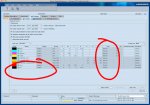
Go to the "Job Settings" tab within the job and set the dieline color to "DieLine" under the TYPE column. You'll have to do this before running the qualify/prepare sequence.
 

Attachments

  • Cockpit.jpg
    Cockpit.jpg
    228 KB · Views: 338
You can create a processing Sequence Template called "All Colors" which can leave spot colors as is.

Just make sure that all Die Lines are set to overprint (either in the original layout files, or using the Printready Trap Editor plug-in in Acrobat). For final output, just turn that specific spot color (die line) channel off in the Job Settings tab.

 
   
Back
Top