


AI - Color Setting

DeltaE

Well-known member
Good afternoon!

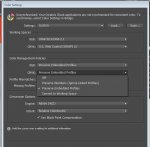
What option do you use in AI for color management? (please check the attached picture)
Color Management Policy
CMYK: Off / Preserve numbers (ignore Linked Profiles) / Preserve embedded profile / Convert to CMYK.

Could you please explain for me about influence of these option to the color appearance in AI and the color value if we use this to make the printing plate?

Thank you and regards,
DeltaE
 

Attachments

  • photo7103.jpg
    photo7103.jpg
    68.1 KB · Views: 307
Hello Delta E,

My word, there is a lot to be said about the options in this window. You can do some serious damage to your files.

A lot depends on what kind of jobs you're printing. If you are printing beautiful colour photography all day or if you just print packaging with just black and two Pantone colours.

It would help to have a general idea of what you print each day.

But first, are you using illustrator to do your step and repeat?
 
Hi Tim,

I am packaging printshop, and we use offset press. For more consistent during production, I will convert some image in artworks with suitable profile.

When doing that, I am confused by two option Off and Preserve number... show me the same result.

regards,
DeltaE
 
Hello Delta E,

So. Stephen has given you a little bed time reading. They are both great references and worth a revisit from time to time. The second link shows you how to use Bridge to sync all your Adobe applications. Once you have a decided your settings you can save them to a file. You can then distribute it to all your other computers that run Adobe applications and sync them all.

As yet Adobe won't let you lock those settings so operators can change them. You have to police the policy you choose..

Good luck
 
   
Back
Top









