

Hi all,
I bought a new v4100, one of the last made, replacing v2100. Had it installed yesterday and mostly the engine is the same but the media library is something else completely, and not in a good way!
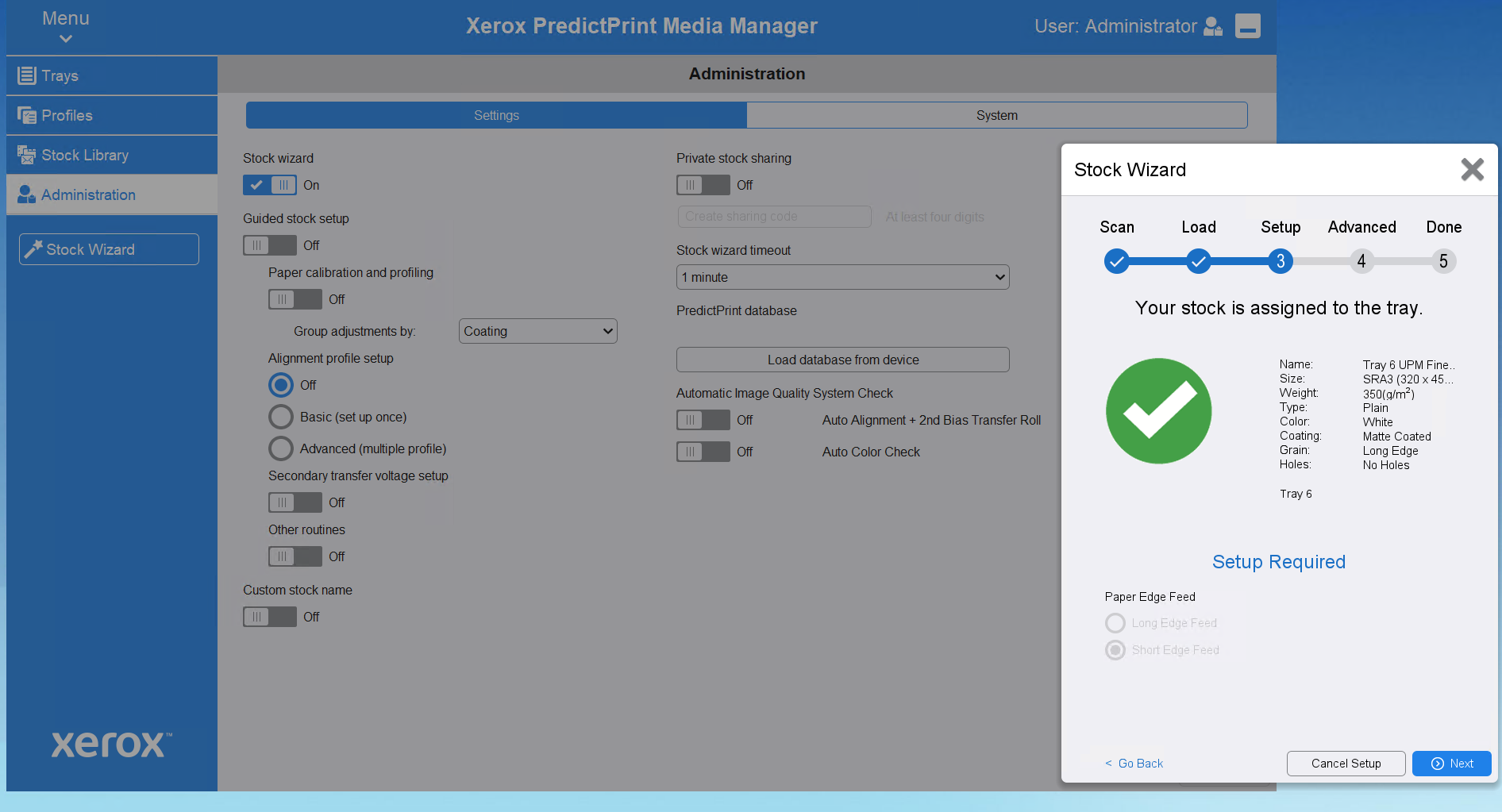
I am not sure if it is a normal behaviour but even when all the settings are off, when loading paper and scanning the code, it still tries to do further setup.
If I click next, then it goes to the last step (Done) BUT deletes the associated alignment profile with the stock! If I have the paper calibration and profiling on, then it tries to do it every f*****g time!
If I cancel Setup at that stage, it doesn't delete it from the paper but it is not logical, and if one makes a mistake to click Next, all goes away.
Not to mention that when a stock is created via the barcode scanner, the alignment profile is not visible or editable, previously (v2100) we could tweak the alignment profiles after they are automatically created and now - no way.
I know where the stocks are and the alignment profiles, are and can edit the files (looks like .xml) but that is a very hack-y way of doing things, and it should be easier.
If that is intended, then it is very wrong! I love the idea of the barcode scanner etc. but the behaviour of the Media Manager is not logical.
Is there something wrong with it or is it a "feature"?
I bought a new v4100, one of the last made, replacing v2100. Had it installed yesterday and mostly the engine is the same but the media library is something else completely, and not in a good way!
I am not sure if it is a normal behaviour but even when all the settings are off, when loading paper and scanning the code, it still tries to do further setup.
If I click next, then it goes to the last step (Done) BUT deletes the associated alignment profile with the stock! If I have the paper calibration and profiling on, then it tries to do it every f*****g time!
If I cancel Setup at that stage, it doesn't delete it from the paper but it is not logical, and if one makes a mistake to click Next, all goes away.
Not to mention that when a stock is created via the barcode scanner, the alignment profile is not visible or editable, previously (v2100) we could tweak the alignment profiles after they are automatically created and now - no way.
I know where the stocks are and the alignment profiles, are and can edit the files (looks like .xml) but that is a very hack-y way of doing things, and it should be easier.
If that is intended, then it is very wrong! I love the idea of the barcode scanner etc. but the behaviour of the Media Manager is not logical.
Is there something wrong with it or is it a "feature"?








