Canon V1000 - Anyone have one? How is it going?

I believe we might of had that problem very early on, but I vaguely remember my techs speaking with techs in New York and they had already solved the problem - it hasn’t come up again, and we are just shy of 1 mil impressions (mixed sizing)
I don’t have any experience with the spot colour problem, as we tend to leave that alone. The colours with the Prisma Controller have been bang on. We do a colour cal/shading cal before all large jobs (nice that it’s automatic) or leave on the auto cal as the job is running.
We did have problems with incorrectly set up media - that gave us some streaking. Also when running small media (8.5x11) with text weights we had increasing the cleaning interval. We do plenty of office docs, with folded sheets within, then job to a run of 12x18 120# cover stock. It’s in these transitions that the increased cleaning interval was implemented. Made a huge difference.
With 13x19, Canon only guarantees images within the 12.5x18.5 realm - that was a little upsetting as we liked to nest full-bleed 4x6 cards on a sheet.. but we just upped our trimming game. ;)
Unfortunately, we can’t relate to the envelope problems, or the backside printing issue - that is odd.
As for your speed slowdown of 12x18 stock, I really haven’t noticed or had it brought to my attention. I did notice that happening with heavy stock, light stock, tabbbed jobs. Just made a setting where all stocks are close in weights, and BAM! We had a similar issue with the KM’s, and it was a painful process to watch and wait for even if the weights were adjusted. These books now rip out ridiculously quick, with no degradation of quality.
I took the plunge, and purchased the PrismaPrepare software suite. It’s powerful and not cheap. Works with all of our Canon large and small format (which surprised Canon!) maybe that should be another thread.
As I’m writing this, a staff member mentioned that for one particular customer who is over the top with greyscale prints, we have to auto cal colours before every job. Without the auto cal functionality, I’d be yanking out the remaining hair on my head ;) We are trying to see if setting up his media to a G7 standard helps… but we all have one of these customers..

The one thing that gets me is the waste toner collectors - I can’t empty them myself. My techs have to do that. Seems a little silly.
 
I believe we might of had that problem very early on, but I vaguely remember my techs speaking with techs in New York and they had already solved the problem - it hasn’t come up again, and we are just shy of 1 mil impressions (mixed sizing)
I don’t have any experience with the spot colour problem, as we tend to leave that alone. The colours with the Prisma Controller have been bang on. We do a colour cal/shading cal before all large jobs (nice that it’s automatic) or leave on the auto cal as the job is running.
We did have problems with incorrectly set up media - that gave us some streaking. Also when running small media (8.5x11) with text weights we had increasing the cleaning interval. We do plenty of office docs, with folded sheets within, then job to a run of 12x18 120# cover stock. It’s in these transitions that the increased cleaning interval was implemented. Made a huge difference.
With 13x19, Canon only guarantees images within the 12.5x18.5 realm - that was a little upsetting as we liked to nest full-bleed 4x6 cards on a sheet.. but we just upped our trimming game. ;)
Unfortunately, we can’t relate to the envelope problems, or the backside printing issue - that is odd.
As for your speed slowdown of 12x18 stock, I really haven’t noticed or had it brought to my attention. I did notice that happening with heavy stock, light stock, tabbbed jobs. Just made a setting where all stocks are close in weights, and BAM! We had a similar issue with the KM’s, and it was a painful process to watch and wait for even if the weights were adjusted. These books now rip out ridiculously quick, with no degradation of quality.
I took the plunge, and purchased the PrismaPrepare software suite. It’s powerful and not cheap. Works with all of our Canon large and small format (which surprised Canon!) maybe that should be another thread.
As I’m writing this, a staff member mentioned that for one particular customer who is over the top with greyscale prints, we have to auto cal colours before every job. Without the auto cal functionality, I’d be yanking out the remaining hair on my head ;) We are trying to see if setting up his media to a G7 standard helps… but we all have one of these customers..

The one thing that gets me is the waste toner collectors - I can’t empty them myself. My techs have to do that. Seems a little silly.
Thanks for the info,

Fuser band walking is being blamed on a faulty sensor in the centering roller assembly. Tech walked me through the repair and it seems plausible. Time will tell, but Canon has instructed the tech to replace the entire roller and sensor assembly. Fingers crossed.

Spot color problem, is not really the color or issues with it lining up to the book and staying, it is the fact the machine needs to be restarted when a tweak to a spot color is made. Very time consuming. I do have the newest version of Prisma Sync and analyst and even Canon need to updated their lab machines to test.

Speed I believe is being artificially slowed because the sensing unit is in use. Machine seems to speed up a bit when the unit is turned off. Still working on getting my timing fully researched to actually determine.

13x19 is printing perfectly fine and at the sheet coverage that I expected.

Prisma Prepare is a beast and the document editing it can do is pretty nice. Been using it for many years, but 8.2 is blowing my mind.

No G7 for me, my operators have a hard enough time keeping up with standard calibration requirements.:ROFLMAO:
 
Our v1000 seems to have mostly settled into it's happy place. We don't seem to be having nearly the issues we were having with it when it first arrived.
 
Sensor swap seemed to have done the trick for the fuser band off center issue. Fuser band is exactly centered 20K 13x19 sheets later.

Spot color adjustment requiring a global change, therefore a restart every time is exhausting, but must be a glitch in the version of controller we are running. I have been told several times it is very new and even Canon demo and some next level support don't have the software yet to test. I will keep my eyes peeled. 26.1.90 (Mark 10.2) is our current version.

Sensing unit does slow the machine down whether on full time or intermittent. I would say 3-6 sheets per minute slower than advertised speed. Hard to place a hard number due to the machine constantly adjusting for quality on the stuff we run, but I have some clean numbers post total run time and it is lagging behind spec speeds. Not a deal breaking issue, but food for thought for folks who need to pump out the fastest speeds this machine can do.

New problem, tech is chasing a line showing up in the print when running any coated sheet. Pretty apparent and has been blamed on the cooling unit somehow, but we will see where this one goes.

My tech is top notch and is in tune with what we are trying to achieve with this engine.
 
New problem, tech is chasing a line showing up in the print when running any coated sheet. Pretty apparent and has been blamed on the cooling unit somehow, but we will see where this one goes.
Is the line showing up on the exact same spot on every print? We're having a similar problem on one of our Canon print engines but not the v1000 (c810). They've been chasing it for 5-6 weeks now.
 
Is the line showing up on the exact same spot on every print? We're having a similar problem on one of our Canon print engines but not the v1000 (c810). They've been chasing it for 5-6 weeks now.
I had same problem on my 910. I think they had to clean some lasers inside the fuser
 
I had same problem on my 910. I think they had to clean some lasers inside the fuser
Canon just went ahead and replaced the fuser band assembly and line went away. Have put 100,000 on it since and all print looks good. Tech said some stuff from factory can have problems.
 
Update on V1000. Have had since mid July. Bugs just about worked out. Had out first set of drum replacements after 170K clicks. Square fold unit has been installed. So far I am impressed with this addon. Been putting this setup through booklet testing and very pleased with it over our old Xerox C1000i.

Post insert unit is still not working as I expected it. Keeps flipping the pre-print items and is messing with my brain when it comes to inserting these items. My Varioprint does not do this and gives me the freedom to insert face up or face down and in any collated order. The V1000 will only let me insert one way and that is frustrating. Getting on my nerves!!

My customers are happy the print finish is not as glossy as the Xerox. The V1000 definitely blends in with the sheet very well and give an excellent flat image and not floating or stacked like the Xerox.

We run a lot of ink on a sheet, so this machine is eating up the ink. Trying to keep up with my inventory duties.
 
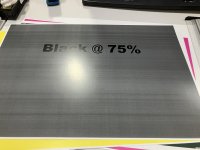
Our update - we were up for a month but now the v1000 has been down for cardstock production for the better part of 2 weeks. Anything that is "coated" can't be printed (looks like the attached image).

We can run lighter media (anything non-coated ) without a problem but if it's media says it's matte coated or gloss coated it comes out like this. Specifying cardstock as uncoated makes everything come out splotchy otherwise we would use that as a resolution.

They just can't seem to resolve this one. These are the kinds of issues that are frustrating with this machine.
When it's running it's great but once there's a problem, it takes a long time to resolve even with our techs doing their best to try to fix it. I've lost count of the number of things/parts they've replaced trying to resolve this problem.

I suspect all the bells and whistles (so many settings everywhere) they put in to “fix” problems end up conflicting with each other when the techs forget or don’t know that someone changed a setting instead of actually fixing a problem and then the next techs don’t know to go undo whatever the previous tech tried/did.
 

Attachments

  • black.jpeg
    black.jpeg
    2.1 MB · Views: 3,679
Last edited:
Our update - we were up for a month but now the v1000 has been down for cardstock production for the better part of 2 weeks. Anything that is "coated" can't be printed (looks like the attached image).

We can run lighter media (anything non-coated ) without a problem but if it's media says it's matte coated or gloss coated it comes out like this. Specifying cardstock as uncoated makes everything come out splotchy otherwise we would use that as a resolution.

They just can't seem to resolve this one. These are the kinds of issues that are frustrating with this machine.
When it's running it's great but once there's a problem, it takes a long time to resolve even with our techs doing their best to try to fix it. I've lost count of the number of things/parts they've replaced trying to resolve this problem.

I suspect all the bells and whistles (so many settings everywhere) they put in to “fix” problems end up conflicting with each other when the techs forget or don’t know that someone changed a setting instead of actually fixing a problem and then the next techs don’t know to go undo whatever the previous tech tried/did.

Hello, were you able to find a solution to this problem?
 
Hello, were you able to find a solution to this problem?
They cleaned out a bunch of things and its a lot better but now they think it's a communication issue between the fiery and the printer so they're planning to replace a motherboard or something to see if that resolves it. So, no solution yet but progress is being made.
 
Last edited:
They cleaned out a bunch of things and its a lot better but now they think it's a communication issue between the fiery and the printer so they're planning to replace a motherboard or something to see if that resolves it. So, no solution yet but progress is being made.
Thanks. If there is a change in the situation, please update me, I will follow up on the issue.

I have the same problem, I use Prismasync rip.
 
Last edited:
They cleaned out a bunch of things and its a lot better but now they think it's a communication issue between the fiery and the printer so they're planning to replace a motherboard or something to see if that resolves it. So, no solution yet but progress is being made.
Hello, We bought a V1000 machine in the spring. After printing a few thousand pages, similar bands appeared along their length. The technician replaced the grid and the corona wire, but it started banding again. After that, he replaced the entire charging unit and it was fixed. But actually black is of much worse quality than the other colors. On the page, the black tone is nice and uniform in some places, and in some places it is very noisy and cloudy. About the fixing unit. Around 50,000 clicks, cracks appear on the fixing belt. The technician said too little oil was used in the factory under the fixing belt. Overall, it prints quite nicely.
 

Attachments

  • IMG_20240430_162829.jpg
    IMG_20240430_162829.jpg
    2 MB · Views: 722
Fast forward on this interesting thread to April 2025. Thank God and the angels we did not buy a V1000. A printer down the road sent us some files to print samples of. Our V700 prints clean as a whistle but the V1000 they have is producing prints that are mottled and the color tends to fade some from top to bottom, an issue I recognize here. He came back just a while ago wanting more prints. There is definitely something wrong with the machine but I'm leaning toward a Fiery related issue. Glad it isn't mine. They are pressing Canon to get the machine replaced with a V800 or V900. Canon is applying all kinds of resistance.
 
Fast forward on this interesting thread to April 2025. Thank God and the angels we did not buy a V1000. A printer down the road sent us some files to print samples of. Our V700 prints clean as a whistle but the V1000 they have is producing prints that are mottled and the color tends to fade some from top to bottom, an issue I recognize here. He came back just a while ago wanting more prints. There is definitely something wrong with the machine but I'm leaning toward a Fiery related issue. Glad it isn't mine. They are pressing Canon to get the machine replaced with a V800 or V900. Canon is applying all kinds of resistance.
We ended up insisting that Canon replacing our V1000 (and our c810) with two V900s in December.
Best. Decision. Ever.
Vastly superior print consistency. Significantly less downtime. We went from seeing repair techs multiple times a week and having the V1000 down more than it was up to seeing the repair tech about 2-3 times a month.

Having said that. I know of another print shop (not near me) that got a V1000 and they've been singing it's praises since then. I should check in and see how it's going now. I know that he has some really experienced repair techs though so it could just be a matter of how good the techs are.
 
Fortunately, I can’t relate with the problems you both have had/having. Our V1000 has been/is running great! Of course we get some pretty nasty jams, but show me a machine that doesn’t. I was just noticing how infrequent my technicians have been in, then one came in for a pm and to clean out our waste toners (which I still find weird, but its working) I have to admit, our technicians are top notch. To say they are tenaciously thorough is an understatement. Are your techs Canon, or dealer based? We have Canon direct, and I believe it makes the difference. I can’t emphasize enough the importance of the registration unit. Do a sample, see that something is off, do an initial registration, and 5 sheets later you are printing perfectly. Have a large run? turn on all the registration an colour checks prior to the job, and walk away knowing the last print will look like your first (now we have forgotten to do this a couple times, and did notice colour shift and registration shift after 10k prints - but that is on us). The staff do these automated tasks every morning. It’s only 3 presses of the screen and your ready for the day.
I’m looking at adding a square fold unit with trimmers (SDD - a Dutch company) to the end of our current configuration. I wouldn’t add anything if the machine wasn’t working for us. I’d love the Plockmatic, but we just don’t have the real estate for it. This is also the reason I can’t add another V1000 for production.
I know we picked the right machine when I have repeat customers telling us how they love our end product. Of course great staff comes into play, but let’s not discount the machine producing the product.
 
Fortunately, I can’t relate with the problems you both have had/having. Our V1000 has been/is running great! Of course we get some pretty nasty jams, but show me a machine that doesn’t. I was just noticing how infrequent my technicians have been in, then one came in for a pm and to clean out our waste toners (which I still find weird, but its working) I have to admit, our technicians are top notch. To say they are tenaciously thorough is an understatement. Are your techs Canon, or dealer based? We have Canon direct, and I believe it makes the difference. I can’t emphasize enough the importance of the registration unit. Do a sample, see that something is off, do an initial registration, and 5 sheets later you are printing perfectly. Have a large run? turn on all the registration an colour checks prior to the job, and walk away knowing the last print will look like your first (now we have forgotten to do this a couple times, and did notice colour shift and registration shift after 10k prints - but that is on us). The staff do these automated tasks every morning. It’s only 3 presses of the screen and your ready for the day.
I’m looking at adding a square fold unit with trimmers (SDD - a Dutch company) to the end of our current configuration. I wouldn’t add anything if the machine wasn’t working for us. I’d love the Plockmatic, but we just don’t have the real estate for it. This is also the reason I can’t add another V1000 for production.
I know we picked the right machine when I have repeat customers telling us how they love our end product. Of course great staff comes into play, but let’s not discount the machine producing the product.
Are you running Fiery's or PrismaSync? I do think the experience of the repair techs makes a big difference, our techs are Canon Direct but the one that was working on the v1000 was fairly inexperienced. We ended up telling Canon we didn't want that tech working alone on the v900s (we replace the v1000 with the v900). I think that has also made a difference with having the newer tech be overseen by someone more experienced. I'm also curious about whether Fiery vs. Prisma makes a difference.
 
We are running PrismaSync, and also PrismaPrepare (this should be another thread). We had Fiery controllers with our KM’s, and I don’t miss it. Have you ever used the PrismaSync controller? Definitely get a demo. I’m not going to lie, the techs are cautious around it. I know they’re not common, but it makes sense to me to use a native controller with a Canon printer. Our guys started out in pairs with our V1000… it was new, unfamiliar, and two heads are better than one. I was patient, they were honest, and everyone became more comfortable, and now only one guy comes out. There was a lot of calls with other techs from other cities for the first 4 months, then eventually everything just clicked. … touch wood ;)

We are also very fortunate that the Canon techs are local, and the guys are usually in our shop in a couple hours.
 
Last edited:
Experience tech point of view

I have 45 years technical experience with Canon copiers and printers. I am really shocked that a dealer sends out an untrained tech on a V1000. This equipment should be serviced by experienced trained color production techs.

Here are the main issues I face with installing a V1000.
Today's fiery is not the same as 10 year old Fiery. Standard features on older Fierys are not standard today. Fiery now requires purchase of licenses for color adjust options and other options that use to be standard. Make sure you write down all the fiery options you use before getting a quote.

Prismasync...honestly I use to hate prisma sync. Since fiery options have changed..I favor prismasync. Very stable and you can manually adjust the image color from the touch screen. Adjust front back registration and much more. Also, costs....you need to pay for impose/compose and prisma prepare software. Runs on your desktop.

Computers and software: paying 100k plus new production printing and not upgrading software and computers. Invest in updating software and a new computer. Unfortunately, all the software companies now charge a yearly fee for use of program. Costs just keep rising.

Changing from one manufacturer to another with Fiery. All the presets will have to be tweaked and adjusted to work on a canon. Say if presets were set to say a Ricoh they will need to be tweaked and re-saved.

V1000 service
I don't understand the issue with quality and all the service calls. Looks to me the techs are not senior techs and lack experience with production color. I love the V1000. Very tech friendly and very few issues. The quality is unmatched. Also the 900 is great.
Now the accessories..that is an issue.
I don't recommend the plockmatic. Not the same plockmatic that has worked for decades. The newer plockmatic me require numerous adjustments to install. I recommend purchase a stand alone plockmatic.
If your volume is not excessive I recommend the canon trimmer and the creasing option. Interfaced with the v1000 and can set up job on computer before printing.

Paper
Yes paper has become complex. New V1000: you will have to autograd and registration adjust every type paper you use. This is not a perfect system. Sometimes you have to experiment with some paper to get the quality you seek.

Printing: printing at 1200 dpi may expose defects not seen on 600dpi. 1200 dpi is for technical images with very fine lines. Experiment with this setting.
 
   
Back
Top